
2016年6月1日 星期三
2014年6月9日 星期一
[Android] 沒有root,還是想抓到.db /取出db檔
程式開發中若涉及SQLite,會很需要常常查看資料庫.db檔來檢視資料的存取正不正確。
但root過的device才能在Eclipse> DDMS> File Explorer> /data/data/<package_name>/databases/資料庫名.db ←找到.db檔
從電腦終端機執行adb shell想把.db檔pull出來, 又有「opendir failed, Permission denied」的問題←因為沒root
如果很不想root device,又想要看.db檔,該怎麼做呢?
這裡提供一個方法,在程式中寫段code把.db檔copy到指定目錄下
// 先建立過Cursor才會產生.db檔
那麼在Eclipse> DDMS> File Explorer> /storage/sdcard0/PieFee/Log/PieFee.db,就可以拿到這個.db檔囉!

但root過的device才能在Eclipse> DDMS> File Explorer> /data/data/<package_name>/databases/資料庫名.db ←找到.db檔
從電腦終端機執行adb shell想把.db檔pull出來, 又有「opendir failed, Permission denied」的問題←因為沒root
如果很不想root device,又想要看.db檔,該怎麼做呢?
這裡提供一個方法,在程式中寫段code把.db檔copy到指定目錄下
// 先建立過Cursor才會產生.db檔
public static boolean copyFile(){
     try{
      String sourceFile = "/data/data/com.tsots.PieFee/databases/PieFee.db";
      String destFile = Environment.getExternalStorageDirectory() + "/PieFee/Log/PieFee.db";
      //File file1 = new File(sourceFile);
      //Log.d("522","file1存在嗎?"+file1.exists());
      //File file2 = new File(destFile);
      //Log.d("522","file2存在嗎?"+file2.exists());

      File file = new File(destFile);
      if(!file.exists()) {
          Log.d("522","路徑之前不存在, 新建立");
          file.getParentFile().mkdirs();
         }

         InputStream in = new FileInputStream(sourceFile);
         OutputStream out = new FileOutputStream(destFile);
         byte[] buf = new byte[8192];
         int len;
         while ((len = in.read(buf)) > 0){
          out.write(buf, 0, len);
         }
         in.close();
         out.close();
         Log.d("522","save file["+destFile+"] ok from["+sourceFile+"]");
     } catch(FileNotFoundException ex){
      Log.d("522", "File Not Found Exception " + ex.toString());
      return false;
     } catch (IOException io){
         return false;
        }
  return true;
 }
那麼在Eclipse> DDMS> File Explorer> /storage/sdcard0/PieFee/Log/PieFee.db,就可以拿到這個.db檔囉!
2012年3月17日 星期六
細說SQLite - insert
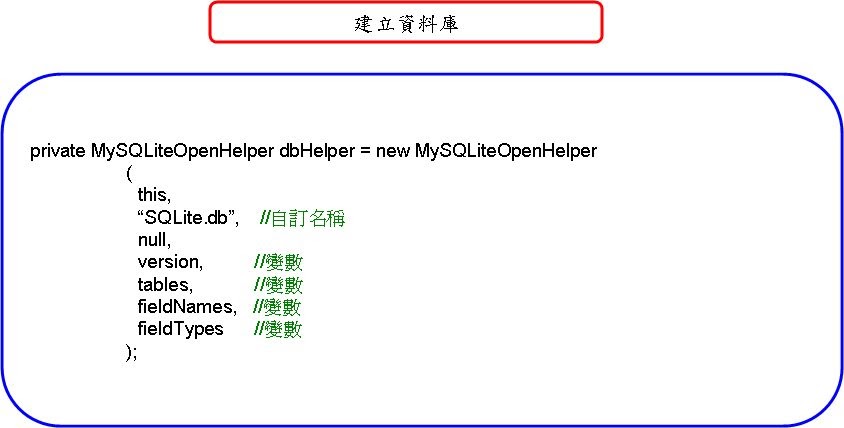
====================只有一筆資料要儲存 ====================

====================同類型的很多筆資料要儲存====================

====================(自動產生識別代號)只有一筆資料要儲存
====================

====================(自動產生識別代號)同類型的很多筆資料要儲存
====================

====================(自動產生識別代號)不同類型各有一筆資料要儲存
====================

====================(自動產生識別代號)不同類型各有多筆資料要儲存
====================

====================不同類型長度不一的多筆資料要儲存
====================

====================多個table
====================
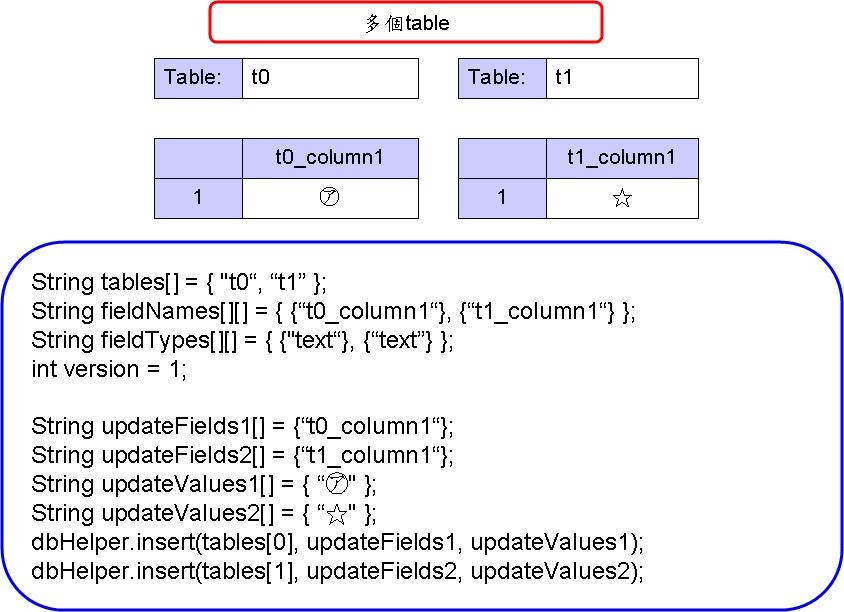
2012年3月12日 星期一
SQLiteOpenHelper ~ 旅遊匯率隨時查(五)
-更新-


======================SQLite======================
String tables[] = {"table_value", "table_listview_exchange", "table_exchangerate", "table_listview_shopping"};
String fieldNames[][] =
{
{ "fieldname_date", "fieldname_country", "fieldname_cash"},
{ "fieldname_id", "fn_exchange_country", "fn_exchange_cash", "fn_exchange_unit"},
{ "fn_country1_exchangerate",
"fn_country2_exchangerate",
"fn_country3_exchangerate",
"fn_country4_exchangerate",
"fn_country5_exchangerate"},
{ "fieldname_id", "fn_shopping_icon", "fn_shopping_item", "fn_shopping_nt"}
};
String fieldTypes[][] =
{
{ "text", "text", "text"},
{ "INTEGER PRIMARY KEY AUTOINCREMENT", "text", "text", "text"},
{ "text", "text", "text", "text", "text"},
{ "INTEGER PRIMARY KEY AUTOINCREMENT", "text", "text", "text"}
};
int version = 1;
private SQLiteOpenHelper_ExchangeRate dbHelper = new SQLiteOpenHelper_ExchangeRate
(
this,
"SQLite_ExchangeRate2.db",
null,
version,
tables,
fieldNames,
fieldTypes
);


======================SQLite======================
String tables[] = {"table_value", "table_listview_exchange", "table_exchangerate", "table_listview_shopping"};
String fieldNames[][] =
{
{ "fieldname_date", "fieldname_country", "fieldname_cash"},
{ "fieldname_id", "fn_exchange_country", "fn_exchange_cash", "fn_exchange_unit"},
{ "fn_country1_exchangerate",
"fn_country2_exchangerate",
"fn_country3_exchangerate",
"fn_country4_exchangerate",
"fn_country5_exchangerate"},
{ "fieldname_id", "fn_shopping_icon", "fn_shopping_item", "fn_shopping_nt"}
};
String fieldTypes[][] =
{
{ "text", "text", "text"},
{ "INTEGER PRIMARY KEY AUTOINCREMENT", "text", "text", "text"},
{ "text", "text", "text", "text", "text"},
{ "INTEGER PRIMARY KEY AUTOINCREMENT", "text", "text", "text"}
};
int version = 1;
private SQLiteOpenHelper_ExchangeRate dbHelper = new SQLiteOpenHelper_ExchangeRate
(
this,
"SQLite_ExchangeRate2.db",
null,
version,
tables,
fieldNames,
fieldTypes
);
2012年3月1日 星期四
長度不一的String[]如何放入SQLite?


1. 定義字串
./res/values/arrays.xml
<?xml version="1.0" encoding="utf-8"?>
<resources>
<string-array name="allapp_category1_ap_item">
<item>a1</item>
<item>a2</item>
<item>a3</item>
<item>a4</item>
<item>a5</item>
</string-array>
<string-array name="allapp_category2_ap_item">
<item>b1</item>
</string-array>
<string-array name="allapp_category3_ap_item">
<item>c1</item>
</string-array>
<string-array name="allapp_category4_ap_item">
<item>d1</item>
<item>d2</item>
<item>d3</item>
</string-array>
<string-array name="allapp_category5_ap_item">
<item></item>
</string-array>
</resources>
<string-array name="allapp_category1_ap_item">
<item>a1</item>
<item>a2</item>
<item>a3</item>
<item>a4</item>
<item>a5</item>
</string-array>
<string-array name="allapp_category2_ap_item">
<item>b1</item>
</string-array>
<string-array name="allapp_category3_ap_item">
<item>c1</item>
</string-array>
<string-array name="allapp_category4_ap_item">
<item>d1</item>
<item>d2</item>
<item>d3</item>
</string-array>
<string-array name="allapp_category5_ap_item">
<item></item>
</string-array>
</resources>
2. 建立SQLite
./src/com/tsots/aplist/aplist.java
String tables[] = {"l_aplist"};
String fieldNames[][] = {
{ "l_id","l_content1", "l_content2", "l_content3", "l_content4", "l_content5"}
{ "l_id","l_content1", "l_content2", "l_content3", "l_content4", "l_content5"}
};
String fieldTypes[][] = {
{ "INTEGER PRIMARY KEY AUTOINCREMENT","text", "text", "text", "text", "text"}
};
int version = 1;
private MySQLiteOpenHelper dbHelper = new MySQLiteOpenHelper (
this,
"SQLite_ApList.db",
null,
version,
tables,
fieldNames,
fieldTypes
);
String fieldTypes[][] = {
{ "INTEGER PRIMARY KEY AUTOINCREMENT","text", "text", "text", "text", "text"}
};
int version = 1;
private MySQLiteOpenHelper dbHelper = new MySQLiteOpenHelper (
this,
"SQLite_ApList.db",
null,
version,
tables,
fieldNames,
fieldTypes
);
3. 預設資料
./src/com/tsots/aplist/aplist.java
String[] contentValues1 = getResources().getStringArray(R.array.allapp_category1_ap_item);
String[] contentValues2 = getResources().getStringArray(R.array.allapp_category2_ap_item);
String[] contentValues3 = getResources().getStringArray(R.array.allapp_category3_ap_item);
String[] contentValues4 = getResources().getStringArray(R.array.allapp_category4_ap_item);
String[] contentValues5 = getResources().getStringArray(R.array.allapp_category5_ap_item);
String[] contentValues2 = getResources().getStringArray(R.array.allapp_category2_ap_item);
String[] contentValues3 = getResources().getStringArray(R.array.allapp_category3_ap_item);
String[] contentValues4 = getResources().getStringArray(R.array.allapp_category4_ap_item);
String[] contentValues5 = getResources().getStringArray(R.array.allapp_category5_ap_item);
String[] contentValues1={“a1”, “a2”, “a3”, “a4”, “a5”};
String[] contentValues2={“b1”};
String[] contentValues3={“c1”};
String[] contentValues4={“d1”, "d2", "d3"};
String[] contentValues5={“ ”};
String[] contentValues2={“b1”};
String[] contentValues3={“c1”};
String[] contentValues4={“d1”, "d2", "d3"};
String[] contentValues5={“ ”};
4. 找出陣列長度的最大值
./src/com/tsots/aplist/aplist.java
String[] updateCategory = {"l_content1", "l_content2", "l_content3", "l_content4", "l_content5"};
String[][] oldAllData = {contentValues1, contentValues2, contentValues3, contentValues4, contentValues5};
int k=0;
int length=0;
while(k<updateCategory.length)
{
if(oldAllData[k].length>length)
{
length = oldAllData[k].length;
}
k++;
}
oldAllData[][] =
{
{“a1”, “a2”, “a3”, “a4”, “a5”},
{“b1”},
{“c1”},
{“d1”, “d2”, “d3”},
{" "}
}
length=5
5. 將所有array重新編排為最大長度, 也就是長度一致
./src/com/tsots/aplist/aplist.java
String[] newContent1=new String[length];
for(int h=0; h<length; h++)
{
if(h > contentValues1.length-1)
{
newContent1[h] = " ";
}
else
{
newContent1[h] = contentValues1[h];
}
}
String[] newContent2 = new String[length];
for(int h=0; h<length; h++)
{
if(h > contentValues2.length-1)
{
newContent2[h] = " ";
}
else
{
newContent2[h] = contentValues2[h];
}
}
String[] newContent3 = new String[length];
for(int h=0; h<length; h++)
{
if(h > contentValues3.length-1)
{
newContent3[h] = " ";
}
else
{
newContent3[h] = contentValues3[h];
}
}
String[] newContent4 = new String[length];
for(int h=0; h<length; h++)
{
if(h > contentValues4.length-1)
{
newContent4[h] = " ";
}
else
{
newContent4[h] = contentValues4[h];
}
}
String[] newContent5 = new String[length];
for(int h=0; h<length; h++)
{
if(h > contentValues5.length-1)
{
newContent5[h] = " ";
}
else
{
newContent5[h] = contentValues5[h];
}
}
String[] newContent1={“a1”, “a2”, “a3”, “a4”, “a5”};
String[] newContent2={“b1”, “ ”, “ ”, “ ”, “ ”};
String[] newContent3={“c1”, “ ”, “ ”, “ ”, “ ”};
String[] newContent4={“d1”, “d2”, “d3”, “ “, “ “};
String[] newContent5={“ ”, “ ”, “ ”, “ ”, “ ”};
6. 存入資料庫, 因為insert()必須一次插入一整列, 所以必須將array轉換成固定y軸的形式
./src/com/tsots/aplist/aplist.java
String[][] newAllData = {newContent1,newContent2,newContent3,newContent4,newContent5};
for(int c=0;c<length;c++)
{
ArrayList<String> newArray = new ArrayList<String>();
for(int m=0;m<newAllData.length;m++)//6
{
newArray.add(newAllData[m][c]);
}
dbHelper.insert(tables[0], updateCategory, newArray.toArray());
}
when c=0
newArray.toString() = [a1,b1,c1,d1, , ]
when c=1
newArray.toString() = [a2, , ,d2, , ]
when c=2
newArray.toString() = [a3, , ,d3, , ]
when c=3
newArray.toString() = [a4, , , , , ]
when c=4
newArray.toString() = [a5, , , , , ]
2012年1月28日 星期六
SQLiteOpenHelper ~ EditText.setOnKeyListener ~ 範例: 財產分配(2)
Fund_SQLiteActivity.java
/*
     * 負責將"fund_money1"欄位的資料紀錄到SQLite中
     */
    public void SQLite_record1(String str_money1)
    {
		String[] updateFields =
		{
				"fund_money1"
		};
		String[] updateValues =
		{
				str_money1
		};
		Cursor c = dbHelper.select(tables[0], null, null, null, null, null, null);
		c.moveToFirst();
    	dbHelper.update(tables[0], updateFields, updateValues, null, null);
    	c.close();
    }
    /*
     * 負責將"fund_money2"欄位的資料紀錄到SQLite中
     */
    public void SQLite_record2(String str_money2)
    {
		String[] updateFields =
		{
				"fund_money2"
		};
		String[] updateValues =
		{
				str_money2
		};
		Cursor c = dbHelper.select(tables[0], null, null, null, null, null, null);
		c.moveToFirst();
    	dbHelper.update(tables[0], updateFields, updateValues, null, null);
    	c.close();
    }
    /*
     * 負責將"fund_money3"欄位的資料紀錄到SQLite中
     */
    public void SQLite_record3(String str_money3)
    {
		String[] updateFields =
		{
				"fund_money3"
		};
		String[] updateValues =
		{
				str_money3
		};
		Cursor c = dbHelper.select(tables[0], null, null, null, null, null, null);
		c.moveToFirst();
    	dbHelper.update(tables[0], updateFields, updateValues, null, null);
    	c.close();
    }
    /*
     * 負責將"fund_money4"欄位的資料紀錄到SQLite中
     */
    public void SQLite_record4(String str_money4)
    {
		String[] updateFields =
		{
				"fund_money4"
		};
		String[] updateValues =
		{
				str_money4
		};
		Cursor c = dbHelper.select(tables[0], null, null, null, null, null, null);
		c.moveToFirst();
    	dbHelper.update(tables[0], updateFields, updateValues, null, null);
    	c.close();
    }

    public void SQLite_record_item1()
    {
		String[] updateFields =
		{
				"fund_item1"
		};
		String[] updateValues =
		{
				et_item1.getText().toString()
		};
		Cursor c = dbHelper.select(tables[1], null, null, null, null, null, null);
		c.moveToFirst();
    	dbHelper.update(tables[1], updateFields, updateValues, null, null);
    	c.close();
		System.out.println(et_item1.getText());
    }
    public void SQLite_record_item2()
    {
		String[] updateFields =
		{
				"fund_item2"
		};
		String[] updateValues =
		{
				et_item2.getText().toString()
		};
		Cursor c = dbHelper.select(tables[1], null, null, null, null, null, null);
		c.moveToFirst();
    	dbHelper.update(tables[1], updateFields, updateValues, null, null);
    	c.close();
		System.out.println(et_item2.getText());
    }
    public void SQLite_record_item3()
    {
		String[] updateFields =
		{
				"fund_item3"
		};
		String[] updateValues =
		{
				et_item3.getText().toString()
		};
		Cursor c = dbHelper.select(tables[1], null, null, null, null, null, null);
		c.moveToFirst();
    	dbHelper.update(tables[1], updateFields, updateValues, null, null);
    	c.close();
		System.out.println(et_item3.getText());
    }
    public void SQLite_record_item4()
    {
		String[] updateFields =
		{
				"fund_item4"
		};
		String[] updateValues =
		{
				et_item4.getText().toString()
		};
		Cursor c = dbHelper.select(tables[1], null, null, null, null, null, null);
		c.moveToFirst();
    	dbHelper.update(tables[1], updateFields, updateValues, null, null);
    	c.close();
		System.out.println(et_item4.getText());
    }

    /*
     * 每一種基金有10個ImageView顯示錢幣, function意圖呈現存款多寡, 不過目前最多只有10個金幣
     */
    public void show_coin1(int money1)
    {
    	ImageView[] imageview1 = {iv1_1, iv1_2, iv1_3, iv1_4, iv1_5, iv1_6, iv1_7, iv1_8, iv1_9, iv1_10};
    	if(money1 <= 10)
    	{
    		for (int i=0; i<10; i++)
	    	{
	    		imageview1[i].setVisibility(View.INVISIBLE);
	    	}
	    	for (int i=0; i

2012年1月27日 星期五
SQLiteOpenHelper ~ EditText.setOnKeyListener ~ 範例: 財產分配(1)

本範例安置很多widget(不是很smart的方式), 故code很長, 分為兩篇~
預設為將財產分配以EditText呈現, 分為4個類別:遊學基金", "結婚基金", "買房基金", "養老基金", User是可以自行更改的, 變動會紀錄在SQLite中.
另外有+1萬與-1萬的ImageButton來調整資金分配, 最下方的TextView會統計總需金額~
Fund_SQLiteActivity.java
package com.tsots.Fund_SQLite;

import android.app.Activity;
import android.content.Context;
import android.database.Cursor;
import android.os.Bundle;
import android.util.Log;
import android.view.KeyEvent;
import android.view.View;
import android.widget.EditText;
import android.widget.ImageButton;
import android.widget.ImageView;
import android.widget.TextView;
import android.widget.Toast;

public class Fund_SQLiteActivity extends Activity
{
 @Override
 protected void onPause()
 {
  SQLite_record_item1();
  SQLite_record_item2();
  SQLite_record_item3();
  SQLite_record_item4();
  super.onPause();
 }

 Context context = Fund_SQLiteActivity.this;
 String TAG = "Fund_SQLiteActivity.this";
 /*建立SQLite, 2個table表, 一個放存款目的紀錄, 一個放存款金額紀錄*/
 String tables[] = {"fund_data", "fund_item"};
 String fieldNames[][] =
 {
    { "fund_id", "fund_money1", "fund_money2", "fund_money3", "fund_money4"},
    { "fund_id", "fund_item1", "fund_item2", "fund_item3", "fund_item4"}
 };
 String fieldTypes[][] =
 {
    { "INTEGER PRIMARY KEY AUTOINCREMENT", "text", "text", "text", "text"},
    { "INTEGER PRIMARY KEY AUTOINCREMENT", "text", "text", "text", "text"}
 };
 int version = 1;
 private Fund_SQLiteOpenHelper dbHelper = new Fund_SQLiteOpenHelper (
                    this,
                    "fund_SQLite.db",
                    null,
                    version,
                    tables,
                    fieldNames,
                    fieldTypes
                     );
 EditText et_item1, et_item2, et_item3, et_item4;
 TextView tv_money1, tv_money2, tv_money3, tv_money4, tv_total;
 ImageButton ib_add1, ib_add2, ib_add3, ib_add4;
 ImageButton ib_del1, ib_del2, ib_del3, ib_del4;
 ImageView iv1_1,iv1_2,iv1_3,iv1_4,iv1_5,iv1_6,iv1_7,iv1_8,iv1_9,iv1_10;
 ImageView iv2_1,iv2_2,iv2_3,iv2_4,iv2_5,iv2_6,iv2_7,iv2_8,iv2_9,iv2_10;
 ImageView iv3_1,iv3_2,iv3_3,iv3_4,iv3_5,iv3_6,iv3_7,iv3_8,iv3_9,iv3_10;
 ImageView iv4_1,iv4_2,iv4_3,iv4_4,iv4_5,iv4_6,iv4_7,iv4_8,iv4_9,iv4_10;

    /** Called when the activity is first created. */
    @Override
    public void onCreate(Bundle savedInstanceState)
    {
        super.onCreate(savedInstanceState);
        setContentView(R.layout.main);
        et_item1 = (EditText) findViewById (R.id.et_item1);
        et_item2 = (EditText) findViewById (R.id.et_item2);
        et_item3 = (EditText) findViewById (R.id.et_item3);
        et_item4 = (EditText) findViewById (R.id.et_item4);
        tv_money1 = (TextView) findViewById (R.id.tv_money1);
        tv_money2 = (TextView) findViewById (R.id.tv_money2);
        tv_money3 = (TextView) findViewById (R.id.tv_money3);
        tv_money4 = (TextView) findViewById (R.id.tv_money4);
        tv_total = (TextView) findViewById (R.id.tv_total);
        ib_add1 = (ImageButton) findViewById (R.id.ib_add1);
        ib_del1 = (ImageButton) findViewById (R.id.ib_del1);
        ib_add2 = (ImageButton) findViewById (R.id.ib_add2);
        ib_del2 = (ImageButton) findViewById (R.id.ib_del2);
        ib_add3 = (ImageButton) findViewById (R.id.ib_add3);
        ib_del3 = (ImageButton) findViewById (R.id.ib_del3);
        ib_add4 = (ImageButton) findViewById (R.id.ib_add4);
        ib_del4 = (ImageButton) findViewById (R.id.ib_del4);
        iv1_1 = (ImageView) findViewById (R.id.iv1_1);
        iv1_2 = (ImageView) findViewById (R.id.iv1_2);
        iv1_3 = (ImageView) findViewById (R.id.iv1_3);
        iv1_4 = (ImageView) findViewById (R.id.iv1_4);
        iv1_5 = (ImageView) findViewById (R.id.iv1_5);
        iv1_6 = (ImageView) findViewById (R.id.iv1_6);
        iv1_7 = (ImageView) findViewById (R.id.iv1_7);
        iv1_8 = (ImageView) findViewById (R.id.iv1_8);
        iv1_9 = (ImageView) findViewById (R.id.iv1_9);
        iv1_10 = (ImageView) findViewById (R.id.iv1_10);
        iv2_1 = (ImageView) findViewById (R.id.iv2_1);
        iv2_2 = (ImageView) findViewById (R.id.iv2_2);
        iv2_3 = (ImageView) findViewById (R.id.iv2_3);
        iv2_4 = (ImageView) findViewById (R.id.iv2_4);
        iv2_5 = (ImageView) findViewById (R.id.iv2_5);
        iv2_6 = (ImageView) findViewById (R.id.iv2_6);
        iv2_7 = (ImageView) findViewById (R.id.iv2_7);
        iv2_8 = (ImageView) findViewById (R.id.iv2_8);
        iv2_9 = (ImageView) findViewById (R.id.iv2_9);
        iv2_10 = (ImageView) findViewById (R.id.iv2_10);
        iv3_1 = (ImageView) findViewById (R.id.iv3_1);
        iv3_2 = (ImageView) findViewById (R.id.iv3_2);
        iv3_3 = (ImageView) findViewById (R.id.iv3_3);
        iv3_4 = (ImageView) findViewById (R.id.iv3_4);
        iv3_5 = (ImageView) findViewById (R.id.iv3_5);
        iv3_6 = (ImageView) findViewById (R.id.iv3_6);
        iv3_7 = (ImageView) findViewById (R.id.iv3_7);
        iv3_8 = (ImageView) findViewById (R.id.iv3_8);
        iv3_9 = (ImageView) findViewById (R.id.iv3_9);
        iv3_10 = (ImageView) findViewById (R.id.iv3_10);
        iv4_1 = (ImageView) findViewById (R.id.iv4_1);
        iv4_2 = (ImageView) findViewById (R.id.iv4_2);
        iv4_3 = (ImageView) findViewById (R.id.iv4_3);
        iv4_4 = (ImageView) findViewById (R.id.iv4_4);
        iv4_5 = (ImageView) findViewById (R.id.iv4_5);
        iv4_6 = (ImageView) findViewById (R.id.iv4_6);
        iv4_7 = (ImageView) findViewById (R.id.iv4_7);
        iv4_8 = (ImageView) findViewById (R.id.iv4_8);
        iv4_9 = (ImageView) findViewById (R.id.iv4_9);
        iv4_10 = (ImageView) findViewById (R.id.iv4_10);
        SQLite_init();
        calculator_total();

        //載入SQLite裡的值
        try
        {
         Cursor c = dbHelper.select(tables[0], null, null, null, null, null, null);
         c.moveToFirst();
         tv_money1.setText(c.getString(1));
         show_coin1(Integer.valueOf(c.getString(1)));
         tv_money2.setText(c.getString(2));
         show_coin2(Integer.valueOf(c.getString(2)));
         tv_money3.setText(c.getString(3));
         show_coin3(Integer.valueOf(c.getString(3)));
         tv_money4.setText(c.getString(4));
         show_coin4(Integer.valueOf(c.getString(4)));
         c.close();
        }
        catch(Exception e)
        {
         Log.d(TAG, "Exception: " + e);
        }
        //載入SQLite裡的值
        try
        {
         Cursor c = dbHelper.select(tables[1], null, null, null, null, null, null);
         c.moveToFirst();
         et_item1.setText(c.getString(1));
         et_item2.setText(c.getString(2));
         et_item3.setText(c.getString(3));
         et_item4.setText(c.getString(4));
         c.close();
        }
        catch(Exception e)
        {
         Log.d(TAG, "Exception: " + e);
        }

        //監聽EditText的變化, 並更新到SQLite中
        et_item1.setOnKeyListener(new EditText.OnKeyListener()
        {
   public boolean onKey(View v, int keyCode, KeyEvent event)
   {
    SQLite_record_item1();
    return false;
   }
  });
        et_item2.setOnKeyListener(new EditText.OnKeyListener()
        {
   public boolean onKey(View v, int keyCode, KeyEvent event)
   {
    SQLite_record_item2();
    return false;
   }
  });
        et_item3.setOnKeyListener(new EditText.OnKeyListener()
        {
   public boolean onKey(View v, int keyCode, KeyEvent event)
   {
    SQLite_record_item3();
    return false;
   }
  });
        et_item4.setOnKeyListener(new EditText.OnKeyListener()
        {
   public boolean onKey(View v, int keyCode, KeyEvent event)
   {
    SQLite_record_item4();
    return false;
   }
  });

        //加一萬
        ib_add1.setOnClickListener(new ImageButton.OnClickListener()
        {
   public void onClick(View v)
   {
    int money1 = Integer.parseInt(tv_money1.getText().toString());
    String str_money1 = String.valueOf(money1+1);
    tv_money1.setText(str_money1);
    SQLite_record1(str_money1);
    show_coin1(money1+1);
    calculator_total();
   }
  });
        //加一萬
        ib_add2.setOnClickListener(new ImageButton.OnClickListener()
        {
   public void onClick(View v)
   {
    int money2 = Integer.parseInt(tv_money2.getText().toString());
    String str_money2 = String.valueOf(money2+1);
    tv_money2.setText(str_money2);
    SQLite_record2(str_money2);
    show_coin2(money2+1);
    calculator_total();
   }
  });
        //加一萬
        ib_add3.setOnClickListener(new ImageButton.OnClickListener()
        {
   public void onClick(View v)
   {
    int money3 = Integer.parseInt(tv_money3.getText().toString());
    String str_money3 = String.valueOf(money3+1);
    tv_money3.setText(str_money3);
    SQLite_record3(str_money3);
    show_coin3(money3+1);
    calculator_total();
   }
  });
        //加一萬
        ib_add4.setOnClickListener(new ImageButton.OnClickListener()
        {
   public void onClick(View v)
   {
    int money4 = Integer.parseInt(tv_money4.getText().toString());
    String str_money4 = String.valueOf(money4+1);
    tv_money4.setText(str_money4);
    SQLite_record4(str_money4);
    show_coin4(money4+1);
    calculator_total();
   }
  });
        //減一萬
        ib_del1.setOnClickListener(new ImageButton.OnClickListener()
        {
   public void onClick(View v)
   {
    int money1 = Integer.parseInt(tv_money1.getText().toString());
    if(money1-1<0)
    {
     Toast.makeText(context, "不要負債喔", Toast.LENGTH_SHORT).show();
    }
    else
    {
     String str_money1 = String.valueOf(money1-1);
     tv_money1.setText(str_money1);
     SQLite_record1(str_money1);
     show_coin1(money1-1);
     calculator_total();
    }
   }
  });
        //減一萬
        ib_del2.setOnClickListener(new ImageButton.OnClickListener()
        {
   public void onClick(View v)
   {
    int money2 = Integer.parseInt(tv_money2.getText().toString());
    if(money2-1<0)
    {
     Toast.makeText(context, "不要負債喔", Toast.LENGTH_SHORT).show();
    }
    else
    {
     String str_money2 = String.valueOf(money2-1);
     tv_money2.setText(str_money2);
     SQLite_record2(str_money2);
     show_coin2(money2-1);
     calculator_total();
    }
   }
  });
        //減一萬
        ib_del3.setOnClickListener(new ImageButton.OnClickListener()
        {
   public void onClick(View v)
   {
    int money3 = Integer.parseInt(tv_money3.getText().toString());
    if(money3-1<0)
    {
     Toast.makeText(context, "不要負債喔", Toast.LENGTH_SHORT).show();
    }
    else
    {
     String str_money3 = String.valueOf(money3-1);
     tv_money3.setText(str_money3);
     SQLite_record3(str_money3);
     show_coin3(money3-1);
     calculator_total();
    }
   }
  });
        //減一萬
        ib_del4.setOnClickListener(new ImageButton.OnClickListener()
        {
   public void onClick(View v)
   {
    int money4 = Integer.parseInt(tv_money4.getText().toString());
    if(money4-1<0)
    {
     Toast.makeText(context, "不要負債喔", Toast.LENGTH_SHORT).show();
    }
    else
    {
     String str_money4 = String.valueOf(money4-1);
     tv_money4.setText(str_money4);
     SQLite_record4(str_money4);
     show_coin4(money4-1);
     calculator_total();
    }
   }
  });
    }

    /*
     * 第一次啟動此AP時, 所有數據的初始值
     */
    public void SQLite_init()
    {
  String[] updateFields1 = {"fund_money1", "fund_money2", "fund_money3", "fund_money4"};
  String[] updateValues1 = {"0","0","0","0"};
  Cursor c1 = dbHelper.select(tables[0], null, null, null, null, null, null);
  c1.moveToFirst();
     if (c1.getCount() < 4)
      {
     dbHelper.insert(tables[0], updateFields1, updateValues1);
      }
     c1.close();

     String[] updateFields2 = {"fund_item1", "fund_item2", "fund_item3", "fund_item4"};
  String[] updateValues2 = {"遊學基金", "結婚基金", "買房基金", "養老基金"};
  Cursor c2 = dbHelper.select(tables[1], null, null, null, null, null, null);
  c2.moveToFirst();
     if (c2.getCount() < 4)
      {
     dbHelper.insert(tables[1], updateFields2, updateValues2);
      }
     c2.close();
    }
2012年1月18日 星期三
How to use SQLite
為了讓user對AP所做的變更能保留下來, 本範例加入SQLite來儲存資料.
開始先建立一個資料表"l_listData",其欄位有兩個: "l_id", "l_data", 代表資料ID與資料字串.
ID是資料庫中自動增加的整數, 讓我們用cursor篩選時可由l_id找到該筆資料並做處理.


得到傳回資料表的資料筆數:cursor.getCount()
得到資料表第index欄的欄名:cursor.getColumnName(0)
得到欄名為name的index:cursor.getColumnIndex("name")
ListView_malloc_SQLite.java
package com.tsots.ListView_malloc_SQLite;

import java.util.ArrayList;
import java.util.List;
import android.app.Activity;
import android.content.Context;
import android.database.Cursor;
import android.os.Bundle;
import android.util.Log;
import android.view.View;
import android.widget.AdapterView;
import android.widget.ArrayAdapter;
import android.widget.Button;
import android.widget.EditText;
import android.widget.ListView;
import android.widget.TextView;

public class ListView_malloc_SQLite extends Activity
{
 String tables[] = {"l_listData"};
 String[] updateFields =
 {
    "l_data"
 };
 String fieldNames[][] =
 {
    { "l_id", "l_data"}
 };
 String fieldTypes[][] =
 {
    { "INTEGER PRIMARY KEY AUTOINCREMENT", "text"}
 };
 int version = 1;
 private MySQLiteOpenHelper dbHelper = new MySQLiteOpenHelper (
                  this,
                  "SQLite_LsitView.db",
                  null,
                  version,    /*version*/
                  tables,
                  fieldNames,
                  fieldTypes
                 );
 Context context = ListView_malloc_SQLite.this;
 String tag = "ListView_malloc_SQLite.this";
 String[] countriesStr;
 TextView myTextView;
 EditText myEditText;
 Button myButton_add;
 Button myButton_remove;
 ListView listview;
 ArrayAdapter adapter2;
 List allData;
 List allId;
 String newData;
 int click_id;
 /** Called when the activity is first created. */
 @Override
 public void onCreate(Bundle savedInstanceState)
 {
  super.onCreate(savedInstanceState);
  setContentView(R.layout.main);

     myTextView = (TextView) findViewById(R.id.myTextView);
     myEditText = (EditText) findViewById(R.id.myEditText);
     myButton_add = (Button) findViewById(R.id.myButton_add);
     myButton_remove = (Button) findViewById(R.id.myButton_remove);
     listview = (ListView) findViewById(R.id.listview1);

     countriesStr = getResources().getStringArray(R.array.array_listview);

     default_sqlite_data();
     load_sqlite_data();

     listview.setOnItemClickListener(new ListView.OnItemClickListener()
     {
      public void onItemClick(AdapterView arg0, View arg1, int id, long arg3)
      {
       myTextView.setText(allData.get(id));
       myEditText.setText(allData.get(id));
       click_id = id;
       System.out.println("select: "+ arg3);
      }
     });

     myButton_add.setOnClickListener(new Button.OnClickListener()
     {
      public void onClick(View arg0)
      {
       newData = myEditText.getText().toString();
       for (int i = 0; i < adapter2.getCount(); i++)
       {
        //若此筆資料已存在列表中, 則不加入
        if (newData.equals(adapter2.getItem(i)))
        {
         return;
        }
       }
       if (!newData.equals(""))
       {
        //寫入資料庫
        String[] updateFields = {"l_data"};
        String[] updateValues = {newData};
        dbHelper.insert(tables[0], updateFields, updateValues);
        //重新讀取一次資料庫
        load_sqlite_data();

        int position = adapter2.getPosition(newData);
        listview.setSelection(position);
        myEditText.setText("");
        Log.i(tag, "add a new data: "+newData);
       }
      }
     });

     myButton_remove.setOnClickListener(new Button.OnClickListener()
     {
      public void onClick(View arg0)
      {
       if (myEditText.getText().toString() != "")
       {
        //從資料庫刪除
        String where = "l_id=?";
           String[] whereValue = {allId.get(click_id)};
        dbHelper.delete(tables[0], where, whereValue);
        //重新讀取一次資料庫
        load_sqlite_data();

        myEditText.setText("");
        if (adapter2.getCount() == 0)
        {
         myTextView.setText("");
        }
        Log.i(tag, "delete a data: "+allData.get(click_id)+" from SQLite");
       }
      }
     });
 }

 public void default_sqlite_data()
 {
  Cursor cursor1 = null;
  try
  {
   cursor1 = dbHelper.select(tables[0], null, null, null, null, null, null);
   System.out.println("cursor1.getCount() = "+cursor1.getCount());
   if(cursor1.getCount() == 0)
   {
    String[] updateFields2 = {"l_data"};
    cursor1.moveToFirst();
    System.out.println("total data = "+countriesStr.length);
    for(int i=0 ; i();
   allId = new ArrayList();
   while (cursor_listdata.moveToNext())
   {
    allId.add(cursor_listdata.getString(0));
    allData.add(cursor_listdata.getString(1));
   }
   adapter2 = new ArrayAdapter(this,android.R.layout.simple_list_item_1, allData);
   listview.setAdapter(adapter2);
  }
  catch(Exception e)
  {
   Log.e(tag, e.toString());
  }
  finally
  {
   cursor_listdata.close();
  }
 }
}//
2012年1月12日 星期四


2012年1月6日 星期五
SQLiteOpenHelper ~ 旅遊匯率隨時查(四)


進一步修改setOnItemClickListener的選單事件, 除了「刪除」選項, 再添加「修改內容」讓User更新已輸入過的資料.
Activity_ExchangeRate.java
lv_shopping.setOnItemClickListener(new OnItemClickListener()
     {
   public void onItemClick(AdapterView arg0, View arg1, int arg2, long arg3)
   {
    intItemSelected = arg2;
    value_shopping_icon = allarray_shopping_icon.get(arg2);
    value_shopping_item = allarray_shopping_item.get(arg2);
    value_shopping_nt = allarray_shopping_nt.get(arg2);

    new AlertDialog.Builder(context)
    .setTitle(R.string.str_dialog_shopping_title)
    //.setMessage(R.string.delete)
          .setItems(R.array.array_onitemclick, di_onclick)
          .setNegativeButton(R.string.str_button_cancel, new DialogInterface.OnClickListener()
          {
           public void onClick(DialogInterface dialog, int whichButton)
           {

           }
          })
          .show();
   }
     });
    }
在此的di_onclick是一個DialogInterface.OnClickListener物件, 用來實作setOnItemClickListener的選單事件, 故在程式中加入以下片段:
Activity_ExchangeRate.java
DialogInterface.OnClickListener di_onclick = new DialogInterface.OnClickListener()
 {
  public void onClick(DialogInterface dialog, int which)
  {
   String[] aryShop = getResources().getStringArray(R.array.array_onitemclick);
   switch(which)
   {
    case ID_MODIFY:
     dailog_id_modify();
     break;
    case ID_DELETE:
     dailog_id_delete();
     break;
   }
  }
 };
為「修改內容」這個選項新增function, 並於其內載入額外設計的layout, 使之佈局如右
並將User所修改的et_dialog_shopping_modify_item.getText().toString()及
et_dialog_shopping_modify_cash.getText().toString()值
存入資料庫欄位"fn_shopping_item"和
"fn_shopping_nt"

Activity_ExchangeRate.java
public void dailog_id_modify()
 {
  LayoutInflater factory = LayoutInflater.from(context);
  view_shopping_modify = factory.inflate(R.layout.layout_dialog_shopping_modify, null);
  et_dialog_shopping_modify_item = (EditText)view_shopping_modify.findViewById(R.id.et_dialog_shopping_modify_item);
  et_dialog_shopping_modify_cash = (EditText)view_shopping_modify.findViewById(R.id.et_dialog_shopping_modify_cash);
  et_dialog_shopping_modify_item.setText(value_shopping_item);
  et_dialog_shopping_modify_cash.setText(value_shopping_nt);
  new AlertDialog.Builder(context)
  .setView(view_shopping_modify)
  .setPositiveButton(R.string.str_button_save, new DialogInterface.OnClickListener()
        {
         public void onClick(DialogInterface dialog, int whichButton)
         {
          Cursor cursor_sqlite_table_listview_shopping = null;
          try
          {
           cursor_sqlite_table_listview_shopping = dbHelper.select(tables[3], null, null, null, null, null, null);
           cursor_sqlite_table_listview_shopping.moveToFirst();
           String[] updateFields = {"fn_shopping_item", "fn_shopping_nt"};
           String[] updateValues = {
                   et_dialog_shopping_modify_item.getText().toString(),
                   et_dialog_shopping_modify_cash.getText().toString()
                 };
           String where = "fn_shopping_icon=?";
           String[] whereValue =
           {
            value_shopping_icon
           };
           System.out.println("et_dialog_shopping_modify_item = "+et_dialog_shopping_modify_item.getText().toString());
           System.out.println("et_dialog_shopping_modify_cash = "+et_dialog_shopping_modify_cash.getText().toString());
           System.out.println("value_shopping_icon = "+value_shopping_icon);
              dbHelper.update(tables[3], updateFields, updateValues, where, whereValue);
              update_listview_shopping();
          }
          catch(Exception e)
          {
           System.out.println("821 Exception : case ID_MODIFY");
          }
          finally
          {
           cursor_sqlite_table_listview_shopping.close();
          }
         }
        })
        .setNegativeButton(R.string.str_button_cancel, new DialogInterface.OnClickListener()
        {
         public void onClick(DialogInterface dialog, int whichButton)
         {

         }
        })
  .show();
 }
至於case ID_DELETE:
也記得刪除資料庫資料後在更新一次ListView
新增function:
Activity_ExchangeRate.java
public void dailog_id_delete()
 {
  new AlertDialog.Builder(context)
        .setMessage("刪除資料「 "+value_shopping_item+" 」?")
        .setPositiveButton(R.string.str_button_yes, new DialogInterface.OnClickListener()
        {
         public void onClick(DialogInterface dialog, int whichButton)
         {
             Cursor cursor_sqlite_table_listview_shopping = null;
             try
             {
              cursor_sqlite_table_listview_shopping = dbHelper.select(tables[3], null, null, null, null, null, null);
           String where = "fieldname_id=?";
           cursor_sqlite_table_listview_shopping.moveToPosition(intItemSelected);
           String[] whereValue =
           {
            cursor_sqlite_table_listview_shopping.getString(0)
           };
        dbHelper.delete(tables[3], where, whereValue);
        update_listview_shopping();
             }
             catch(Exception e)
             {

             }
             finally
             {
              cursor_sqlite_table_listview_shopping.close();
             }
         }
        })
        .setNegativeButton(R.string.str_button_cancel, new DialogInterface.OnClickListener()
        {
         public void onClick(DialogInterface dialog, int whichButton)
         {

         }
        })
        .show();
 }
2012年1月5日 星期四
SQLiteOpenHelper ~ 旅遊匯率隨時查(三)

這篇新增加一個可以自行輸入購買商品資訊的功能,
讓外出旅遊除了可以隨時計算匯率,
更可以紀錄自己敗了哪些東西啦~
為此,
除了修改layout (layout_exchangerate.xml),
再新增Adapter_ListView_Shopping.java來自訂第2個ListView的樣式, 其載入layout_adapter_listview_shopping.xml 內含三個TextView,
code的架構如下

Adapter_ListView_Shopping.java
package com.tsots.ExchangeRate;

import java.util.List;
import android.content.Context;
import android.view.LayoutInflater;
import android.view.View;
import android.view.ViewGroup;
import android.widget.BaseAdapter;
import android.widget.TextView;

public class Adapter_ListView_Shopping extends BaseAdapter
{
 private LayoutInflater mInflater;
 List adapter_allarray_shopping_icon;
 List adapter_allarray_shopping_item;
 List adapter_allarray_shopping_nt;
 TextView column_shopping_icon;
 TextView column_shopping_item;
 TextView column_shopping_nt;

 public Adapter_ListView_Shopping
 (
   Context context,
   int simple_list_item_single_choice,
   List allarray_shopping_icon,
   List allarray_shopping_item,
   List allarray_shopping_nt
 )
 {
  mInflater = LayoutInflater.from(context);
  adapter_allarray_shopping_icon = allarray_shopping_icon;
  adapter_allarray_shopping_item = allarray_shopping_item;
  adapter_allarray_shopping_nt = allarray_shopping_nt;
 }

 public int getCount()
 {
  return adapter_allarray_shopping_item.size();
 }

 public Object getItem(int position)
 {
  return adapter_allarray_shopping_item.size();
 }

 public long getItemId(int position)
 {
  return position;
 }

 public View getView(int position,View convertView,ViewGroup parent)
 {
  convertView = mInflater.inflate(R.layout.layout_adapter_listview_shopping,null);
  column_shopping_icon = (TextView)convertView.findViewById(R.id.column_shopping_icon);
  column_shopping_item = (TextView)convertView.findViewById(R.id.column_shopping_item);
  column_shopping_nt = (TextView)convertView.findViewById(R.id.column_shopping_nt);
      column_shopping_icon.setText(adapter_allarray_shopping_icon.get(position).toString());
      column_shopping_item.setText(adapter_allarray_shopping_item.get(position).toString());
      column_shopping_nt.setText(adapter_allarray_shopping_nt.get(position).toString());
     return convertView;
 }
}
在主程式的部份,
新增bt_save button的onClick事件,
將user所輸入的et_item和et_money值存入資料庫並更新到ListView (lv_shopping)
新增bt_save button的onClick事件,
將user所輸入的et_item和et_money值存入資料庫並更新到ListView (lv_shopping)
Activity_ExchangeRate.java
bt_save.setOnClickListener(new OnClickListener()
        {
   public void onClick(View v)
   {
    et_item.getText().toString();
    et_money.getText().toString();
    //存入資料庫
    save_sqlite_table_listview_shopping();
    //另外呼叫function做setAdapter
    update_listview_shopping();
   }
        });
/*
* 更新ListView畫面資料
*/
Activity_ExchangeRate.java
public void update_listview_shopping()
    {
     Log.i(Tag, "設定listview_shopping內容");
     allarray_shopping_icon = new ArrayList();
     allarray_shopping_item = new ArrayList();
     allarray_shopping_nt = new ArrayList();
     Cursor cursor_sqlite_table_listview_shopping = null;
     try
     {
      cursor_sqlite_table_listview_shopping = dbHelper.select(tables[3], null, null, null, null, null, null);
      cursor_sqlite_table_listview_shopping.moveToFirst();
      do
      {
       allarray_shopping_icon.add(cursor_sqlite_table_listview_shopping.getString(0));
       allarray_shopping_item.add(cursor_sqlite_table_listview_shopping.getString(2));
       allarray_shopping_nt.add(cursor_sqlite_table_listview_shopping.getString(3));
      }while(cursor_sqlite_table_listview_shopping.moveToNext());
     }
     catch(Exception e)
     {
      System.out.println("501 Exception : update_listview()");
     }
     finally
     {
      cursor_sqlite_table_listview_shopping.close();
     }

     /*新增購物列表*/
     adapter_listview_shopping = new Adapter_ListView_Shopping
     (
      context,
      android.R.layout.simple_list_item_1,
      allarray_shopping_icon,
      allarray_shopping_item,
      allarray_shopping_nt
     );
     //將ListAdapter的可選(Focusable)選單選項打開
     lv_shopping.setItemsCanFocus(true);
     lv_shopping.setFocusable(true);
     //設定ListView選單選項設為每次只能單一選項
     lv_shopping.setChoiceMode(ListView.CHOICE_MODE_SINGLE);
     lv_shopping.setAdapter(adapter_listview_shopping);
    }
/*
* 新增tables[3]內的資料
* {"fieldname_id", "fn_shopping_icon", "fn_shopping_item", "fn_shopping_nt"}
*/
Activity_ExchangeRate.java
public void save_sqlite_table_listview_shopping()
    {
     Log.i(Tag, "儲存tables[3]資料ing...");
     Cursor cursor_sqlite_table_listview_shopping = null;
  try
  {
   cursor_sqlite_table_listview_shopping = dbHelper.select(tables[3], null, null, null, null, null, null);
   cursor_sqlite_table_listview_shopping.moveToFirst();
   String[] updateFields = {"fn_shopping_icon", "fn_shopping_item", "fn_shopping_nt"};
   String[] updateValues = {"1", et_item.getText().toString(), et_money.getText().toString()};
   dbHelper.insert(tables[3], updateFields, updateValues);
      //dbHelper.update(tables[3], updateFields, updateValues, null, null);
  }
  catch(Exception e)
  {
   System.out.println("219 Exception : save_sqlite_table_listview_shopping()");
  }
  finally
  {
   cursor_sqlite_table_listview_shopping.close();
  }
    }
最後加入lv_shopping的onItemClick事件,
讓user可以將加入過的資料做刪除
Activity_ExchangeRate.java
lv_shopping.setOnItemClickListener(new OnItemClickListener()
     {
   public void onItemClick(AdapterView arg0, View arg1, int arg2, long arg3)
   {
    intItemSelected = arg2;
    new AlertDialog.Builder(context)
          .setMessage("delete item "+arg2+" ?")
          .setPositiveButton("yes",new DialogInterface.OnClickListener()
          {
           public void onClick(DialogInterface dialog, int whichButton)
           {
               Cursor cursor_sqlite_table_listview_shopping = null;
               try
               {
                cursor_sqlite_table_listview_shopping = dbHelper.select(tables[3], null, null, null, null, null, null);
                   String where = "fieldname_id=?";
                   String[] whereValue =
                   {
                    allarray_shopping_icon.get(intItemSelected)
                   };
                dbHelper.delete(tables[3], where, whereValue);
                update_listview_shopping();
               }
               catch(Exception e)
               {

               }
               finally
               {
                cursor_sqlite_table_listview_shopping.close();
               }
           }
          })
          .setNegativeButton("no", new DialogInterface.OnClickListener()
          {
           public void onClick(DialogInterface dialog, int whichButton)
           {

           }
          })
          .show();
   }
     });
為使lv_shopping的"fn_shopping_icon"在Activity顯示重新編號, 修改以下部份
public void update_listview_shopping()
    {
    ...
try
{
      cursor_sqlite_table_listview_shopping = dbHelper.select(tables[3], null, null, null, null, null, null);
      cursor_sqlite_table_listview_shopping.moveToFirst();
      int count =0;
      do
      {
       count++;
       //allarray_shopping_icon.add(cursor_sqlite_table_listview_shopping.getString(0));
       allarray_shopping_icon.add(String.valueOf(count));
       allarray_shopping_item.add(cursor_sqlite_table_listview_shopping.getString(2));
              allarray_shopping_nt.add(cursor_sqlite_table_listview_shopping.getString(3));
      }while(cursor_sqlite_table_listview_shopping.moveToNext());
     }
     ...
    }
lv_shopping.setOnItemClickListener(new OnItemClickListener()
     {
   public void onItemClick(AdapterView arg0, View arg1, int arg2, long arg3)
   {
...
try
               {
                cursor_sqlite_table_listview_shopping = dbHelper.select(tables[3], null, null, null, null, null, null);
                   String where = "fieldname_id=?";
cursor_sqlite_table_listview_shopping.moveToPosition(intItemSelected);
String[] whereValue =
                   {
                    //allarray_shopping_icon.get(intItemSelected)
cursor_sqlite_table_listview_shopping.getString(0)
};
                dbHelper.delete(tables[3], where, whereValue);
                update_listview_shopping();
               }
});

2012年1月4日 星期三
onCreateOptionsMenu ~ 旅遊匯率隨時查(二) ~ startActivity; AlertDialog.Builder; Uri


Activity_ExchangeRate.java
package com.tsots.ExchangeRate;
import java.text.DecimalFormat;
import java.util.ArrayList;
import java.util.List;
import android.app.Activity;
import android.app.AlertDialog;
import android.content.Context;
import android.content.DialogInterface;
import android.content.Intent;
import android.database.Cursor;
import android.net.ConnectivityManager;
import android.net.NetworkInfo;
import android.net.Uri;
import android.os.Bundle;
import android.util.Log;
import android.view.LayoutInflater;
import android.view.Menu;
import android.view.MenuItem;
import android.view.View;
import android.view.View.OnClickListener;
import android.widget.AdapterView;
import android.widget.ArrayAdapter;
import android.widget.Button;
import android.widget.EditText;
import android.widget.ListView;
import android.widget.Spinner;
import android.widget.TextView;
import android.widget.Toast;
public class Activity_ExchangeRate extends Activity
{
Context context = Activity_ExchangeRate.this;
final int MENU_ABOUT = Menu.FIRST;
final int MENU_UPDTAE_EXCHANGERATE = Menu.FIRST + 1;
final int MENU_SEARCH_EXCHANGERATE = Menu.FIRST + 2;
private View view_update_exchangerate;
private EditText /*et_cash_nt,*/ et_cash_peso, et_cash_aud, et_cash_usd;
String Tag = "Activity_ExchangeRate.java";
TextView tv_updatedate;
Spinner spinner_cash;
ListView lv_exchange;
EditText et_cash;
Button bt_exchange;
ArrayAdapter adapter_spinner_country;
Adapter_ListView_Exchange adapter_listview_exchange;
java.text.SimpleDateFormat sdf;
String tables[] = {"table_value", "table_listData", "table_exchangerate"};
String fieldNames[][] =
{
{ "fieldname_date", "fieldname_country", "fieldname_cash"},
{ "fieldname_id", "fieldname_column_country", "fieldname_column_cash", "fieldname_column_unit"},
{ "fieldname_country1_exchangerate",
"fieldname_country2_exchangerate",
"fieldname_country3_exchangerate",
"fieldname_country4_exchangerate"}
};
String fieldTypes[][] =
{
{ "text", "text", "text"},
{ "INTEGER PRIMARY KEY AUTOINCREMENT", "text", "text", "text"},
{ "text", "text", "text", "text"},
};
int version = 1;
private SQLiteOpenHelper_ExchangeRate dbHelper = new SQLiteOpenHelper_ExchangeRate
(
this,
"SQLite_ExchangeRate.db",
null,
version,
tables,
fieldNames,
fieldTypes
);
String selected_country;
int int_selected_country;
String[] array_country;
String[] array_cash;
String[] array_unit;
String[] array_deafault_exchangerate;
List allarray_country = new ArrayList();
List allarray_cash;
List final_allarray_cash;
List allarray_unit = new ArrayList();
List all_id;
DecimalFormat nf = new DecimalFormat("0.00000");
/** Called when the activity is first created. */
@Override
public void onCreate(Bundle savedInstanceState)
{
super.onCreate(savedInstanceState);
setContentView(R.layout.layout_exchangerate);
bt_exchange = (Button) findViewById (R.id.bt_exchange);
et_cash = (EditText) findViewById (R.id.et_cash);
array_country = getResources().getStringArray(R.array.array_country);
array_cash = getResources().getStringArray(R.array.array_cash);
array_unit = getResources().getStringArray(R.array.array_unit);
array_deafault_exchangerate = getResources().getStringArray(R.array.array_cash);
tv_updatedate = (TextView) findViewById (R.id.tv_updatedate);
spinner_cash = (Spinner) findViewById (R.id.spinner_cash);
lv_exchange = (ListView) findViewById (R.id.lv_exchange);
sdf = new java.text.SimpleDateFormat("yyyy-MM-dd HH:mm:ss");
default_sqlite_table_listdata();
update_spinner();
update_listview();
bt_exchange.setOnClickListener(new OnClickListener()
{
public void onClick(View v)
{
Log.i(Tag, "匯率換算ing...");
//擷取EditText的值, 更新allarray_cash
System.out.println("116 et_cash.getText().toString() = "+et_cash.getText().toString());
System.out.println("117 allarray_cash = "+ allarray_cash);
if(!et_cash.getText().toString().equals(""))
{
save_sqlite_table_value();
save_sqlite_table_listData();
//save_sqlite_table_exchangerate();
Log.i(Tag, "更新畫面資料");
update_spinner();
update_listview();
}
else
{
Toast.makeText(context, "請輸入正確數字", Toast.LENGTH_SHORT).show();
allarray_cash = new ArrayList();
for (int i=0; i<4 ; i++)
{
allarray_cash.add("");
}
save_sqlite_table_listData();
update_listview();
}
}
});
}
//AP關閉前執行
@Override
protected void onPause()
{
save_sqlite_table_value();
save_sqlite_table_listData();
super.onPause();
}
@Override
public boolean onOptionsItemSelected(MenuItem item)
{
super.onOptionsItemSelected(item);
switch (item.getItemId())
{
case MENU_ABOUT:
startActivity(new Intent(this, Menu_About.class));
break;
case MENU_UPDTAE_EXCHANGERATE:
menu_update_exchangerate();
break;
case MENU_SEARCH_EXCHANGERATE:
//檢查網路狀態
if (checkInternet() == true)
{
//台灣銀行營業時間牌告匯率
Uri uri = Uri.parse("http://rate.bot.com.tw/Pages/Static/UIP003.zh-TW.htm");
Intent intent = new Intent(Intent.ACTION_VIEW, uri);
startActivity(intent);
}
else
{
Toast.makeText(context, getResources().getString(R.string.str_checkInternet), Toast.LENGTH_SHORT).show();
}
break;
}
return true;
}
/*
* 加入Menu選單
*/
@Override
public boolean onCreateOptionsMenu(Menu menu)
{
super.onCreateOptionsMenu(menu);
menu.add(Menu.NONE, MENU_ABOUT, 0, R.string.str_menu_about)
.setIcon(R.drawable.icon_menu_about);
menu.add(Menu.NONE, MENU_UPDTAE_EXCHANGERATE, 0, R.string.str_menu_update_exchangerate)
.setIcon(R.drawable.icon_menu_update_exchangerate);
menu.add(Menu.NONE, MENU_SEARCH_EXCHANGERATE, 0, R.string.str_menu_search_exchangerate)
.setIcon(R.drawable.icon_menu_search_exchangerate);
return true;
}
/*
* 更新tables[0]
* TextView更新日期 Spinner所選貨幣 EditText兌換金額
* {"fieldname_date", "fieldname_country", "fieldname_cash"}
*/
public void save_sqlite_table_value()
{
Log.i(Tag, "儲存tables[0]資料ing...");
Cursor cursor_sqlite_table_value = null;
try
{
cursor_sqlite_table_value = dbHelper.select(tables[0], null, null, null, null, null, null);
cursor_sqlite_table_value.moveToFirst();
String[] updateFields = {"fieldname_date", "fieldname_country", "fieldname_cash"};
String[] updateValues = {tv_updatedate.getText().toString(), String.valueOf(int_selected_country), et_cash.getText().toString()};
dbHelper.update(tables[0], updateFields, updateValues, null, null);
}
catch(Exception e)
{
System.out.println("219 Exception : save_sqlite_table_value()");
}
finally
{
cursor_sqlite_table_value.close();
}
}
/*
* 更新tables[1]
* 換算後各國幣值List
* {"fieldname_column_cash"}
*/
public void save_sqlite_table_listData()
{
Log.i(Tag, "儲存tables[1]資料ing...");
Cursor cursor_sqlite_table_listdata = null;
try
{
cursor_sqlite_table_listdata = dbHelper.select(tables[1], null, null, null, null, null, null);
cursor_sqlite_table_listdata.moveToFirst();
//更新資料庫
String[] updateFields = {"fieldname_column_cash"};
String where = "fieldname_id=?";
int position = 1;
do
{
if(position <= cursor_sqlite_table_listdata.getCount())
{
String[] updateValues = {allarray_cash.get(position-1)};
String[] whereValue = {String.valueOf(position)};
dbHelper.update(tables[1], updateFields, updateValues, where, whereValue);
position++;
}
}while(cursor_sqlite_table_listdata.moveToNext());
}
catch(Exception e)
{
System.out.println("257 Exception : save_sqlite_table_listData()");
}
finally
{
cursor_sqlite_table_listdata.close();
}
}
/*
* 更新tables[2]
* 台幣 菲律賓幣 澳幣 美金
* { "fieldname_country1_exchangerate", "fieldname_country2_exchangerate", "fieldname_country3_exchangerate", "fieldname_country4_exchangerate"}
*/
public void save_sqlite_table_exchangerate()
{
Log.i(Tag, "儲存tables[2]資料ing...");
Cursor cursor_sqlite_table_exchangerate = null;
try
{
cursor_sqlite_table_exchangerate = dbHelper.select(tables[2], null, null, null, null, null, null);
cursor_sqlite_table_exchangerate.moveToFirst();
//更新資料庫
String[] updateFields = { "fieldname_country1_exchangerate", "fieldname_country2_exchangerate", "fieldname_country3_exchangerate", "fieldname_country4_exchangerate"};
String[] updateValues = {allarray_cash.get(0), allarray_cash.get(1), allarray_cash.get(2), allarray_cash.get(3)};
dbHelper.update(tables[2], updateFields, updateValues, null, null);
}
catch(Exception e)
{
System.out.println("285 Exception : save_sqlite_table_exchangerate()");
}
finally
{
cursor_sqlite_table_exchangerate.close();
}
}
/*
* 更新Spinner畫面資料
*/
public void update_spinner()
{
Log.i(Tag, "設定Spinner選項");
Cursor cursor_sqlite_table_value = null;
//try
//{
cursor_sqlite_table_value = dbHelper.select(tables[0], null, null, null, null, null, null);
cursor_sqlite_table_value.moveToFirst();
tv_updatedate.setText(cursor_sqlite_table_value.getString(0));
et_cash.setText(cursor_sqlite_table_value.getString(2));
//}
//catch(Exception e)
//{
adapter_spinner_country = new ArrayAdapter(this, android.R.layout.simple_spinner_item, array_country);
adapter_spinner_country.setDropDownViewResource(android.R.layout.simple_spinner_dropdown_item);
spinner_cash.setAdapter(adapter_spinner_country);
//從SQLite中擷取資料, 避免spinner item又跳回預設值0
spinner_cash.setSelection(Integer.valueOf(cursor_sqlite_table_value.getString(1)));
spinner_cash.setOnItemSelectedListener(new Spinner.OnItemSelectedListener()
{
public void onItemSelected(AdapterView arg0, View arg1, int arg2, long arg3)
{
int_selected_country = arg2;
//依Spinner的選項更改, 置換ListView的幣值換算結果
change_selected_country(int_selected_country);
save_sqlite_table_value();
save_sqlite_table_listData();
//save_sqlite_table_exchangerate();
update_listview();
}
public void onNothingSelected(AdapterView arg0)
{
}
});
//}
//finally
//{
cursor_sqlite_table_value.close();
//}
}
/*
* 更新ListView畫面資料
*/
public void update_listview()
{
Log.i(Tag, "設定ListView內容");
Cursor cursor_sqlite_table_listdata = null;
try
{
//在此必須初使化allarray_cash, 否則ListView資料無法更新
final_allarray_cash = new ArrayList();
cursor_sqlite_table_listdata = dbHelper.select(tables[1], null, null, null, null, null, null);
cursor_sqlite_table_listdata.moveToFirst();
do
{
allarray_country.add(cursor_sqlite_table_listdata.getString(1));
final_allarray_cash.add(cursor_sqlite_table_listdata.getString(2));
allarray_unit.add(cursor_sqlite_table_listdata.getString(3));
}while(cursor_sqlite_table_listdata.moveToNext());
}
catch(Exception e)
{
System.out.println("360 Exception : update_listview()");
}
finally
{
cursor_sqlite_table_listdata.close();
}
adapter_listview_exchange = new Adapter_ListView_Exchange
(
this,
android.R.layout.simple_list_item_1,
allarray_country,
final_allarray_cash,
allarray_unit
);
lv_exchange.setAdapter(adapter_listview_exchange);
}
/*
* 先將SQLite欄位的預設值填好, 避免之後select時產生Exception
*/
public void default_sqlite_table_listdata()
{
Log.i(Tag, "載入SQLite預設值");
//insert tables[0]
Cursor cursor_sqlite_table_value = null;
try
{
cursor_sqlite_table_value = dbHelper.select(tables[0], null, null, null, null, null, null);
cursor_sqlite_table_value.moveToFirst();
String[] updateFields = {"fieldname_date", "fieldname_country", "fieldname_cash"};
if(cursor_sqlite_table_value.getCount() == 0)
{
String[] updateValues = {"2012-01-03", "0", "1"};
dbHelper.insert(tables[0], updateFields, updateValues);
}
}
catch(Exception e)
{
System.out.println("399 Exception : default_sqlite_table_listdata()");
}
finally
{
cursor_sqlite_table_value.close();
}
//insert tables[1]
Cursor cursor_sqlite_table_listdata = null;
try
{
cursor_sqlite_table_listdata = dbHelper.select(tables[1], null, null, null, null, null, null);
cursor_sqlite_table_listdata.moveToFirst();
String[] updateFields = {"fieldname_column_country", "fieldname_column_cash", "fieldname_column_unit"};
if(cursor_sqlite_table_listdata.getCount() == 0)
{
for(int i=0 ; i();
cursor_sqlite_table_exchangerate = dbHelper.select(tables[2], null, null, null, null, null, null);
cursor_sqlite_table_exchangerate.moveToFirst();
if(int_selected_country == 0)
{
allarray_cash.add(et_cash.getText().toString());
allarray_cash.add(String.valueOf(nf.format(Double.valueOf(cursor_sqlite_table_exchangerate.getString(1))*Double.valueOf(et_cash.getText().toString()))));
allarray_cash.add(String.valueOf(nf.format(Double.valueOf(cursor_sqlite_table_exchangerate.getString(2))*Double.valueOf(et_cash.getText().toString()))));
allarray_cash.add(String.valueOf(nf.format(Double.valueOf(cursor_sqlite_table_exchangerate.getString(3))*Double.valueOf(et_cash.getText().toString()))));
System.out.println("474 "+allarray_cash);
}
else if(int_selected_country == 1)
{
allarray_cash.add(String.valueOf(nf.format(Double.parseDouble(cursor_sqlite_table_exchangerate.getString(0))/Double.parseDouble(cursor_sqlite_table_exchangerate.getString(1))*Double.valueOf(et_cash.getText().toString()))));
//allarray_cash.add(String.valueOf(nf.format(Double.valueOf(cursor_sqlite_table_exchangerate.getString(1))*Double.valueOf(et_cash.getText().toString()))));
allarray_cash.add(et_cash.getText().toString());
allarray_cash.add(String.valueOf(nf.format(Double.parseDouble(cursor_sqlite_table_exchangerate.getString(2))/Double.parseDouble(cursor_sqlite_table_exchangerate.getString(1))*Double.valueOf(et_cash.getText().toString()))));
allarray_cash.add(String.valueOf(nf.format(Double.parseDouble(cursor_sqlite_table_exchangerate.getString(3))/Double.parseDouble(cursor_sqlite_table_exchangerate.getString(1))*Double.valueOf(et_cash.getText().toString()))));
System.out.println("483 "+allarray_cash);
}
else if(int_selected_country == 2)
{
allarray_cash.add(String.valueOf(nf.format(Double.parseDouble(cursor_sqlite_table_exchangerate.getString(0))/Double.parseDouble(cursor_sqlite_table_exchangerate.getString(2))*Double.valueOf(et_cash.getText().toString()))));
allarray_cash.add(String.valueOf(nf.format(Double.parseDouble(cursor_sqlite_table_exchangerate.getString(1))/Double.parseDouble(cursor_sqlite_table_exchangerate.getString(2))*Double.valueOf(et_cash.getText().toString()))));
//allarray_cash.add(String.valueOf(nf.format(Double.valueOf(cursor_sqlite_table_exchangerate.getString(2))*Double.valueOf(et_cash.getText().toString()))));
allarray_cash.add(et_cash.getText().toString());
allarray_cash.add(String.valueOf(nf.format(Double.parseDouble(cursor_sqlite_table_exchangerate.getString(3))/Double.parseDouble(cursor_sqlite_table_exchangerate.getString(2))*Double.valueOf(et_cash.getText().toString()))));
System.out.println("491 "+allarray_cash);
}
else
{
allarray_cash.add(String.valueOf(nf.format(Double.parseDouble(cursor_sqlite_table_exchangerate.getString(0))/Double.parseDouble(cursor_sqlite_table_exchangerate.getString(3))*Double.valueOf(et_cash.getText().toString()))));
allarray_cash.add(String.valueOf(nf.format(Double.parseDouble(cursor_sqlite_table_exchangerate.getString(1))/Double.parseDouble(cursor_sqlite_table_exchangerate.getString(3))*Double.valueOf(et_cash.getText().toString()))));
allarray_cash.add(String.valueOf(nf.format(Double.parseDouble(cursor_sqlite_table_exchangerate.getString(2))/Double.parseDouble(cursor_sqlite_table_exchangerate.getString(3))*Double.valueOf(et_cash.getText().toString()))));
//allarray_cash.add(String.valueOf(nf.format(Double.valueOf(cursor_sqlite_table_exchangerate.getString(3))*Double.valueOf(et_cash.getText().toString()))));
allarray_cash.add(et_cash.getText().toString());
System.out.println("500 "+allarray_cash);
}
}
catch(Exception e)
{
System.out.println("506 Exception : change_selected_country(int int_selected_country)");
}
finally
{
cursor_sqlite_table_exchangerate.close();
}
}
/*
* MENU_UPDTAE_EXCHANGERATE所要做的事情
*/
public void menu_update_exchangerate()
{
LayoutInflater factory = LayoutInflater.from(context);
view_update_exchangerate = factory.inflate(R.layout.layout_dialog_update_exchangerate, null);
//et_cash_nt = (EditText)view_update_exchangerate.findViewById(R.id.et_cash_nt);
et_cash_peso = (EditText)view_update_exchangerate.findViewById(R.id.et_cash_peso);
et_cash_aud = (EditText)view_update_exchangerate.findViewById(R.id.et_cash_aud);
et_cash_usd = (EditText)view_update_exchangerate.findViewById(R.id.et_cash_us);
Cursor cursor_sqlite_table_exchangerate = null;
try
{
cursor_sqlite_table_exchangerate = dbHelper.select(tables[2], null, null, null, null, null, null);
cursor_sqlite_table_exchangerate.moveToFirst();
//et_cash_nt.setText(cursor_sqlite_table_exchangerate.getString(0));
et_cash_peso.setText(String.valueOf(nf.format(1.0/Double.valueOf(cursor_sqlite_table_exchangerate.getString(1)))));
et_cash_aud.setText(String.valueOf(nf.format(1.0/Double.valueOf(cursor_sqlite_table_exchangerate.getString(2)))));
et_cash_usd.setText(String.valueOf(nf.format(1.0/Double.valueOf(cursor_sqlite_table_exchangerate.getString(3)))));
new AlertDialog.Builder(context)
.setView(view_update_exchangerate)
.setPositiveButton(R.string.str_button_save, new DialogInterface.OnClickListener()
{
public void onClick(DialogInterface dialog, int whichButton)
{
tv_updatedate.setText(sdf.format(new java.util.Date()));
Cursor cursor_sqlite_table_exchangerate = null;
try
{
cursor_sqlite_table_exchangerate = dbHelper.select(tables[2], null, null, null, null, null, null);
cursor_sqlite_table_exchangerate.moveToFirst();
String[] updateFields = {//"fieldname_country1_exchangerate",
"fieldname_country2_exchangerate",
"fieldname_country3_exchangerate",
"fieldname_country4_exchangerate"};
String[] updateValues = {//String.valueOf(nf.format(1.0/Double.valueOf(et_cash_nt.getText().toString()))),
String.valueOf(nf.format(1.0/Double.valueOf(et_cash_peso.getText().toString()))),
String.valueOf(nf.format(1.0/Double.valueOf(et_cash_aud.getText().toString()))),
String.valueOf(nf.format(1.0/Double.valueOf(et_cash_usd.getText().toString())))};
dbHelper.update(tables[2], updateFields, updateValues, null, null);
//對應的匯率結果也做修正
change_selected_country(spinner_cash.getSelectedItemPosition());
//更新tables[1]
save_sqlite_table_listData();
//更新ListView
update_listview();
}
catch(Exception e)
{
System.out.println("564 Exception : setPositiveButton{}");
}
finally
{
cursor_sqlite_table_exchangerate.close();
}
}
})
.setNegativeButton(R.string.str_button_cancel, new DialogInterface.OnClickListener()
{
public void onClick(DialogInterface dialog, int whichButton)
{
}
})
.show();
}
catch(Exception e)
{
System.out.println("583 Exception : MENU_UPDTAE_EXCHANGERATE");
}
finally
{
cursor_sqlite_table_exchangerate.close();
}
}
/*
* 檢查網路狀態, 必須加入權限
*
*/
public boolean checkInternet()
{
boolean result = false;
ConnectivityManager connManager = (ConnectivityManager)getSystemService(Context.CONNECTIVITY_SERVICE);
NetworkInfo info = connManager.getActiveNetworkInfo();
if (info == null || !info.isConnected())
{
result = false;
}
else
{
if (!info.isAvailable())
result = false;
else
result = true;
}
return result;
}
}
// //
訂閱:
文章 (Atom)