總網頁瀏覽量

關於我自己

我的相片
人生的必修課是接受無常,人生的選修課是放下執著。
顯示具有 HorizontalScrollView 標籤的文章。 顯示所有文章

2012年3月27日 星期二

[HorizontalScrollView] 水平滾動無螢寬限制>> 資料庫SQLite

承上一篇的code
[HorizontalScrollView] 水平滾動無螢寬限制>> 載入GridView

< 定義於.java >
1. 預設TableRow包含6個TextView
2. 在此想讓user按下畫面中的Button後, 能無限增加水平列的widget, 即使會超出螢寬
3. 增加onClick()與onFocusChange()行為
4. 重新命名/新增/刪除
5. 依TableRow不同的View載入對應的GridView
6. SQLite記載TableRow中view的資訊

    [宣告]
    String tables[] = { "t_allApp_category"};

    String fieldNames[][] =
    {
            { "f_category_id", "f_category" }         
    };
    String fieldTypes[][] =
    {
            { "INTEGER PRIMARY KEY AUTOINCREMENT", "text" }
    };

    int version = 1;
    private MySQLiteOpenHelper dbHelper = new MySQLiteOpenHelper
    (
             this,
             "SQLite_Hori_malloc.db",
             null,
             version,    /*version*/
             tables,
             fieldNames,
             fieldTypes
     );


    [新增]
    Cursor c_category = null;       
    c_category = dbHelper.select(tables[0], null, null, null, null, null, null);
    if(c_category.getCount() == 0)
    {
        //initial table[0] data
        String[] updateCategory = {"f_category"};           
        for(int i=0 ; i<str_array_tv.length ; i++)
        {
            String mCategoryValues[] = {str_array_tv[i]};
            dbHelper.insert(tables[0], updateCategory, mCategoryValues);
        }
    }

    [更新]
    String[] updateCategory = {"f_category"};           
    String[] updateValues = {et_category_rename.getText().toString()};
    String where = "f_category_id=?";
    String[] whereValue = {String.valueOf(categoryPresent)};
    dbHelper.update(tables[0], updateCategory, updateValues, where, whereValue);

    [刪除]
    String where = "f_category_id=?";
    String[] whereValue = {categoryPresent};
    dbHelper.delete(tables[0], where, whereValue);


2012年3月26日 星期一

[HorizontalScrollView] 水平滾動無螢寬限制>> 載入GridView

承上一篇的code
[HorizontalScrollView] 水平滾動無螢寬限制>> Rename/New/Delete 行為


< 定義於.java >
1. 預設TableRow包含6個TextView
2. 在此想讓user按下畫面中的Button後, 能無限增加水平列的widget, 即使會超出螢寬
3. 增加onClick()與onFocusChange()行為
4. 重新命名/新增/刪除
5. 依TableRow不同的View載入GridView


./src/com.tsots.Hori_malloc/Hori_malloc_FC.java (只挑重點補充)
    //Click事件的監聽, show出內容
    array_tv[i].setOnClickListener(new OnClickListener()
    {
        @Override
        public void onClick(View v)
        {          
             //紀錄view的位置
            categoryPresent = ii+1;
            //被Click的項目要調整背景色
            setCategoryBackground(ii);
            //載入對應的GridView內容
            funCategoryContent(categoryPresent);
         }             
    });  
    //LongClick事件的監聽, show出選單
    array_tv[i].setOnLongClickListener(new OnLongClickListener()
    {
         @Override
         public boolean onLongClick(View v)
         {
            
//紀錄view的位置
             categoryPresent = ii+1;
             //載入Dialog
             funDialog(array_tv[ii]);
             return false;
         }              
    }); 

    public void setCategoryBackground(int categoryPosition)
    {
        //逐一筆對, 若為當前click的view, 則改變背景色
        for(int i=0; i<array_tv.length; i++)
        {
            if(i == categoryPosition)
            {
                array_tv[i].setBackgroundResource(R.drawable.label_focus);
            }
            else
            {
                array_tv[i].setBackgroundResource(R.drawable.label_selected);
            }
        }
    }


    public void funCategoryContent(int nowCategory)

nowCategory == 1
    {
        //初始化ArrayList
        category_pag = new ArrayList<String>();
        category_title = new ArrayList<String>();
        category_icon = new ArrayList<Bitmap>();   
       
        //取得系統中所有AP, 也包含不可Launch的
        List<ApplicationInfo> allappInfo = 


packageManager.getInstalledApplications(PackageManager.GET_ACTIVITIES);


        //AP名稱按英文字母排序
        Collections.sort(allappInfo, new ApplicationInfo.DisplayNameComparator(packageManager));


        for(int i = 0 ; i <allappInfo.size() ; i ++)
        {


nowCategory ==2

            ApplicationInfo appAI = allappInfo.get(i);
            //取得系統中可Launch的AP
            Intent intent = packageManager.getLaunchIntentForPackage(appAI.packageName);
            if (intent != null)
            {               
                if(nowCategory == 1)


                {                            
                    funLoadAP(appAI);
                }
                else if(nowCategory == 2)


                {
                    //取得系統中可Launch的系統AP
                    if ((appAI.flags & appAI.FLAG_SYSTEM) > 0)
                    {
                        funLoadAP(appAI);
                    }
                }
                else if(nowCategory == 3)

nowCategory ==3

                {
                    //取得系統中可Launch的手動安裝AP
                    if ((appAI.flags & appAI.FLAG_SYSTEM) <= 0)
                    {
                        funLoadAP(appAI);
                    }
                }
            }
        }       
        //蒐集 AP NAME 和 AP ICON 給class CategoryAdapter
        mCategoryAdapter = new CategoryAdapter(context, category_title, category_icon);       
        gv_category.setAdapter(mCategoryAdapter);
    }


    //提供"Rename", "New", "Delete"的選單

    public void funDialog(final TextView textview)
    {
        //請參考上一篇~

    }

    public void funLoadAP(ApplicationInfo appAI)
    {
        String apPag = appAI.packageName;                          //com.android.launcher
        String apName = appAI.loadLabel(packageManager).toString();//Launcher
        Drawable apIcon = appAI.loadIcon(packageManager);          //android.graphics.drawable.BitmapDrawable@2ae99f60
        ApplicationInfo apInfo = appAI;                            //ApplicationInfo{2ad52d98 com.android.launcher}

        category_pag.add(apPag);                   
        category_title.add(apName);
        //將Drawable轉為Bitmap
        Bitmap bp = drawableToBitmap(apIcon);
        //以Bitmap的型態來調整icon大小
        category_icon.add(fixSize(bp));
        title.setText("AP : "+String.valueOf(category_title.size()) + " piece");
    }

    static Bitmap drawableToBitmap(Drawable drawable)
    {          
        Bitmap.Config c =drawable.getOpacity() != PixelFormat.OPAQUE ? Bitmap.Config.ARGB_8888 : Bitmap.Config.RGB_565;
        Bitmap bitmap = Bitmap.createBitmap( drawable.getIntrinsicWidth(), drawable.getIntrinsicHeight(),  c);
        Canvas canvas = new Canvas(bitmap);
        drawable.setBounds(0, 0, drawable.getIntrinsicWidth(), drawable.getIntrinsicHeight());
        drawable.draw(canvas);
        return bitmap;
    }


    public Bitmap fixSize(Bitmap entry_icon)
    {
        int iconWidth = 0;
        int iconHeight = 0;
        int newIconWidth = 80;
        int newIconHeight = 80;
        iconWidth = entry_icon.getWidth();
        iconHeight = entry_icon.getHeight();
        float scaleIconWidth = ((float) newIconWidth) / iconWidth;
        float scaleIconHeight = ((float) newIconHeight) / iconHeight;
        Matrix iconMatrix = new Matrix();
        iconMatrix.postScale(scaleIconWidth, scaleIconHeight);
        iconBitmap = Bitmap.createBitmap(entry_icon, 0, 0,iconWidth, iconHeight, iconMatrix, true);
        return iconBitmap;
    }


--------------------------------------------------------------------------------------------------------------


    class CategoryAdapter extends BaseAdapter
    {
        private Context mContext;
       
        ArrayList<String> adapterTitle;// = new ArrayList<String>();
        ArrayList<Bitmap> adapterIcon;// = new ArrayList<Bitmap>();
       
        public CategoryAdapter(Context c, ArrayList<String> category_title, ArrayList<Bitmap> category_icon)
        {
            mContext = c;
            adapterTitle = category_title;
            adapterIcon = category_icon;
        }
       
        public int getCount()
        {
            return adapterTitle.size();
        }
   
        public Object getItem(int position)
        {
            return adapterTitle.get(position);
        }
   
        public long getItemId(int position)
        {
            return position;
        }
   
        public View getView(int position, View convertView, ViewGroup parent)
        {   
            LayoutInflater factory = LayoutInflater.from(mContext);
            View v = (View) factory.inflate(R.layout.all_app_item, null);
            TextView textView = (TextView) v.findViewById(R.id.name);
            textView.setCompoundDrawablesWithIntrinsicBounds(null, new BitmapDrawable(adapterIcon.get(position)), null, null);
            textView.setText(adapterTitle.get(position).toString());
            return v;
        }
    }

2012年3月25日 星期日

[HorizontalScrollView] 水平滾動無螢寬限制>> Rename/New/Delete 行為

承上一篇的code
[HorizontalScrollView] 水平滾動無螢寬限制>>增加Focus與Click行為

< 定義於.java >
1. 預設TableRow包含6個TextView
2. 在此想讓user按下畫面中的Button後, 能無限增加水平列的widget, 即使會超出螢寬
3. 增加onClick()與onFocusChange()行為
4. 重新命名/新增/刪除

./src/com.tsots.Hori_malloc/Hori_malloc_FC.java (改寫如下)
public class Activity_Hori_malloc extends Activity
{
    Context context = Activity_Hori_malloc.this;
    HorizontalScrollView scrollView;
    TableRow row;
    TextView tv1, tv2, tv3, tv4, tv5, tv6;
    TextView[] array_tv = {tv1, tv2, tv3, tv4, tv5, tv6};
    int categoryPresent = 1;
    int rowChildCount = 6;
    int newrowChild = 0;
    final int ID_RENAME = 0;
    final int ID_NEW = 1;
    final int ID_DELETE = 2;
   
    @Override
    public void onCreate(Bundle savedInstanceState)
    {
        this.requestWindowFeature(Window.FEATURE_NO_TITLE);
        super.onCreate(savedInstanceState);
        setContentView(R.layout.main);
              
        scrollView = (HorizontalScrollView) findViewById(R.id.scrollView);
        row = (TableRow) scrollView.findViewById(R.id.row);
       
        // 一開啟AP需要看到6個TextView, 即是做初始化設定
        funInitTableItem();
    }
    
    //[初始化]設定TextView的格式
    public void funInitTableItem()
    {
        for(int i=0 ; i<rowChildCount ; i++)
        {
            array_tv[i]= new TextView(context);
            array_tv[i].setText("text"+(i+1));
            array_tv[i].setHeight(80);
            array_tv[i].setWidth(280);
            array_tv[i].setGravity(Gravity.CENTER);
            array_tv[i].setTextSize(60);               
            array_tv[i].setFocusable(true);
            array_tv[i].setFocusableInTouchMode(true);
            array_tv[i].setBackgroundResource(R.drawable.selector_app_category);
            row.addView(array_tv[i]);
        }       
        funInitFocusAction();
    }

    //[初始化]設定TextView的Focus及Click行為
    public void funInitFocusAction()
    {
        for(int i=0 ; i<rowChildCount ; i++)
        {        
            final int ii = i;
            array_tv[i].setOnFocusChangeListener(new OnFocusChangeListener()
            {
                @Override
                public void onFocusChange(View v, boolean hasFocus)
                {               
                    if(hasFocus == true)
                    {
                        categoryPresent = ii+1;
                        Toast.makeText(context, "focus "+array_tv[ii].getText().toString(), Toast.LENGTH_SHORT).show();
                    }
                }           
            });
            array_tv[i].setOnClickListener(new OnClickListener()
            {
                @Override
                public void onClick(View v)
                {
                    categoryPresent = ii+1;
                    Toast.makeText(context, "tvs click "+categoryPresent, Toast.LENGTH_SHORT).show();
                    funDialog(array_tv[ii]);
                }              
            });                           
        }
    }
   
    //[新項目]設定TextView的格式
    public void funNewTableItem()
    {
        final TextView tv = new TextView(context);
        newrowChild++;
        tv.setText("Newtext"+newrowChild);
        tv.setHeight(80);
        tv.setWidth(280);
        tv.setGravity(Gravity.CENTER);
        tv.setTextSize(60);               
        tv.setFocusable(true);
        tv.setFocusableInTouchMode(true);
        tv.setBackgroundResource(R.drawable.selector_app_category);
        row.addView(tv);
       
        funNewFocusAction(tv);   
    }

    //[新項目]設定TextView的Focus及Click行為
    public void funNewFocusAction(final TextView textview)
    {
        textview.setOnClickListener(new OnClickListener()
        {
            @Override
            public void onClick(View v)
            {
                Toast.makeText(context, "click "+textview.getText().toString(), Toast.LENGTH_SHORT).show();       
                funDialog(textview);
            }              
        });
        textview.setOnFocusChangeListener(new OnFocusChangeListener()
        {
            @Override
            public void onFocusChange(View v, boolean hasFocus)
            {               
                if(hasFocus == true)
                {
                    Toast.makeText(context, "focus "+textview.getText().toString(), Toast.LENGTH_SHORT).show();
                }
            }           
        });
    }
   
    //建立Dialog

    public void funDialog(final TextView textview)
    {
        AlertDialog.Builder AB = new AlertDialog.Builder(context);                   
       
        DialogInterface.OnClickListener DIO = new DialogInterface.OnClickListener()
        {
            @Override
            public void onClick(DialogInterface dialog, int which)
            {
                switch(which)
                {
                    case ID_RENAME:     //int ID_RENAME = 0;

                        textview.setText("rename");
                        break;
                    case ID_NEW:           //int ID_NEW = 1;

                        funNewTableItem();
                        break;
                    case ID_DELETE:     //int ID_DELETE = 2;

                        funDeleteTableItem(row.indexOfChild(textview));
                        break;
                }
            }                       
        };
       
        String[] items = {"Rename", "New", "Delete"};
        AB.setItems(items, DIO);
        AB.show();
    }

    public void funDeleteTableItem(int index)
    {
        // index = row.indexOfChild(textview)
        row.removeViewAt(index);
        //表示TableRow內含的widget數量-1
        rowChildCount--;       
    }
}

2012年3月23日 星期五

[HorizontalScrollView] 水平滾動無螢寬限制>>增加Focus與Click行為

< 定義於.java >
1. 預設TableRow包含6個TextView
2. 在此想讓user按下畫面中的Button後, 能無限增加水平列的widget, 即使會超出螢寬
3. 增加onClick()與onFocusChange()行為

./src/com.tsots.Hori_malloc/Hori_malloc_FC.java (改寫如下)

public class Activity_Hori_malloc extends Activity
{
    Context context = Activity_Hori_malloc.this;
    HorizontalScrollView scrollView;
    TableRow row;
    Button bt;
    TextView tv1, tv2, tv3, tv4, tv5, tv6;
    TextView[] array_tv = {tv1, tv2, tv3, tv4, tv5, tv6};
    int categoryPresent = 1;
    int rowChildCount = 6;
   
    @Override
    public void onCreate(Bundle savedInstanceState)
    {
        this.requestWindowFeature(Window.FEATURE_NO_TITLE);
        super.onCreate(savedInstanceState);
        setContentView(R.layout.main);
              
        scrollView = (HorizontalScrollView) findViewById(R.id.scrollView);
        row = (TableRow) scrollView.findViewById(R.id.row);
        bt = (Button) findViewById (R.id.bt);
       
        funInitTableItem();           
  
        bt.setOnClickListener(new OnClickListener()
        {
            @Override
            public void onClick(View arg0)
            {
                funNewTableItem();                   
            }          
        }); 
    }
    
    //[初始化]設定TextView的格式
    public void funInitTableItem()
    {
        for(int i=0 ; i<rowChildCount ; i++)
        {
            array_tv[i]= new TextView(context);
            array_tv[i].setText("text"+(i+1));
            array_tv[i].setHeight(80);
            array_tv[i].setWidth(280);
            array_tv[i].setGravity(Gravity.CENTER);
            array_tv[i].setTextSize(60);               
            array_tv[i].setFocusable(true);
            array_tv[i].setFocusableInTouchMode(true);
            array_tv[i].setBackgroundResource(R.drawable.selector_app_category);
            row.addView(array_tv[i]);
        }
       
        funInitFocusAction();
    }
    //[初始化]設定TextView的Focus及Click行為


    public void funInitFocusAction()
    {
        for(int i=0 ; i<rowChildCount ; i++)
        {        
            final int ii = i;
            array_tv[i].setOnFocusChangeListener(new OnFocusChangeListener()
            {
                @Override
                public void onFocusChange(View v, boolean hasFocus)
                {               
                    if(hasFocus == true)
                    {
                        categoryPresent = ii+1;
                        Toast.makeText(context, "tvs focus "+categoryPresent, Toast.LENGTH_SHORT).show();
                    }
                }           
            });
            array_tv[i].setOnClickListener(new OnClickListener()
            {
                @Override
                public void onClick(View v)
                {
                    categoryPresent = ii+1;
                    Toast.makeText(context, "tvs click "+categoryPresent, Toast.LENGTH_SHORT).show();
                }              
            });                           
        }
    }
   
    //[新項目]設定TextView的格式

    public void funNewTableItem()
    {
        //先將TableRow內含的widget清空
        row.removeAllViews();
        //表示TableRow內含的widget數量+1
        rowChildCount++;

        for(int i=0 ; i<rowChildCount ; i++)
        { 
            final TextView tv = new TextView(context);
            tv.setText("Newtext"+(i+1));
            tv.setHeight(80);
            tv.setWidth(280);
            tv.setGravity(Gravity.CENTER);
            tv.setTextSize(60);               
            tv.setFocusable(true);
            tv.setFocusableInTouchMode(true);
            tv.setBackgroundResource(R.drawable.selector_app_category);

            row.addView(tv);                
            funNewFocusAction(tv);
        }       
    }
    //[新項目]設定TextView的Focus及Click行為


    public void funNewFocusAction(final TextView textview)

    {
        textview.setOnClickListener(new OnClickListener()
        {
            @Override
            public void onClick(View v)
            {
                Toast.makeText(context, "click "+textview.getText().toString(), Toast.LENGTH_SHORT).show();                   
            }              
        });
        textview.setOnFocusChangeListener(new OnFocusChangeListener()
        {
            @Override
            public void onFocusChange(View v, boolean hasFocus)
            {               
                if(hasFocus == true)
                {
                    Toast.makeText(context, "focus "+textview.getText().toString(), Toast.LENGTH_SHORT).show();
                }
            }           
        });
    }
}


%%%%%%%%%%%%%%%%%延伸學習%%%%%%%%%%%%%%%%%%%%%%%%% 

[HorizontalScrollView] 水平滾動無螢寬限制>> Rename/New/Delete 行為

http://bedingfield-tsots.blogspot.tw/2012/06/horizontalscrollview-renamenewdelete.html

2012年3月22日 星期四

[HorizontalScrollView] 水平滾動無螢寬限制 (進階)


< 定義於.java >
在此想讓user按下畫面中的Button後, 能無限增加水平列的widget, 即使會超出螢寬

./res/layout/main.xml (這邊只擷取重點段)
    <LinearLayout
        android:orientation="vertical"
        android:layout_width="match_parent"
        android:layout_height="match_parent"
        android:background="@drawable/content_area"
        android:layout_marginLeft="40dp"
        android:layout_marginRight="40dp"
        android:layout_marginBottom="40dp"
        >
        <HorizontalScrollView
            android:id="@+id/scrollView"
            android:layout_width="fill_parent"
            android:layout_height="80dp"
            android:layout_marginTop="40dp"
            android:layout_marginLeft="80dp"
            android:layout_marginRight="80dp"
            >
            <TableLayout

                android:layout_width="fill_parent"
                android:layout_height="fill_parent"
                android:orientation="horizontal"
                >
                <TableRow

                    android:id="@+id/row"
                    android:layout_width="fill_parent"
                    android:layout_height="fill_parent"
                    />
            </TableLayout>          
        </HorizontalScrollView>

       
        <Button
            android:id="@+id/bt"
            android:layout_width="match_parent"
            android:layout_height="wrap_content"
            android:layout_marginTop="40dp"
            android:layout_marginLeft="80dp"
            android:layout_marginRight="80dp"
            android:text="button"
            android:textSize="50sp"
            />
    </LinearLayout>


./src/com.tsots.Hori_malloc/Hori_malloc.java
package com.tsots.Hori_malloc;

import android.app.Activity;
import android.content.Context;
import android.os.Bundle;
import android.view.Gravity;
import android.view.View;
import android.view.View.OnClickListener;
import android.view.Window;
import android.widget.Button;
import android.widget.HorizontalScrollView;
import android.widget.TableRow;
import android.widget.TextView;


public class Activity_Hori_malloc extends Activity
{
    Context context = Activity_Hori_malloc.this;
    HorizontalScrollView scrollView;
    TableRow row;
    Button bt;
    TextView tv1;
    TextView tv2;


    @Override
    public void onCreate(Bundle savedInstanceState)
    {
        this.requestWindowFeature(Window.FEATURE_NO_TITLE);
        super.onCreate(savedInstanceState);
        setContentView(R.layout.main);
             
        scrollView = (HorizontalScrollView) findViewById(R.id.scrollView);
        row = (TableRow) scrollView.findViewById(R.id.row);
        bt = (Button) findViewById (R.id.bt);       
        

        //一樣預設是6個TextView, 不過宣告在.java
        for (int i = 0; i < 6; i++)
        {  
            tv1 = new TextView(context);
            tv1.setText("text");
            tv1.setHeight(80);
            tv1.setWidth(280);
            //文字的部份要置中
            tv1.setGravity(Gravity.CENTER);
            tv1.setTextSize(60);
            //使可以被focus
            tv1.setFocusable(true);
            tv1.setFocusableInTouchMode(true);
            //被focus時底色的變化
            tv1.setBackgroundResource(R.drawable.selector_app_category);

            //
將widget加進TableRow中
            row.addView(tv1);
        }
 

        //當user按下Button就新增一個widget在TableRow中       
        bt.setOnClickListener(new OnClickListener()
        {
            @Override
            public void onClick(View arg0)
            {
                tv2 = new TextView(context);
                tv2.setText("New Text");
                tv2.setHeight(80);
                tv2.setWidth(280);
                tv2.setGravity(Gravity.CENTER);
                tv2.setTextSize(60);
                tv2.setFocusable(true);
                tv2.setFocusableInTouchMode(true);
                tv2.setBackgroundResource(R.drawable.selector_app_category);

                //將圖加入TextView中:
setCompoundDrawablesWithIntrinsicBounds(Drawable放左, Drawable放上, Drawable放右, Drawable放下)            tv2.setCompoundDrawablesWithIntrinsicBounds(getResources().getDrawable(R.drawable.bear3), null, null, null);

                row.addView(tv2);
            }         
        });                    
    }     

}

手指在
HorizontalScrollView上做滑動或
adb shell input keyevent 22向右移動
可以看到新增加的widget

2012年3月21日 星期三

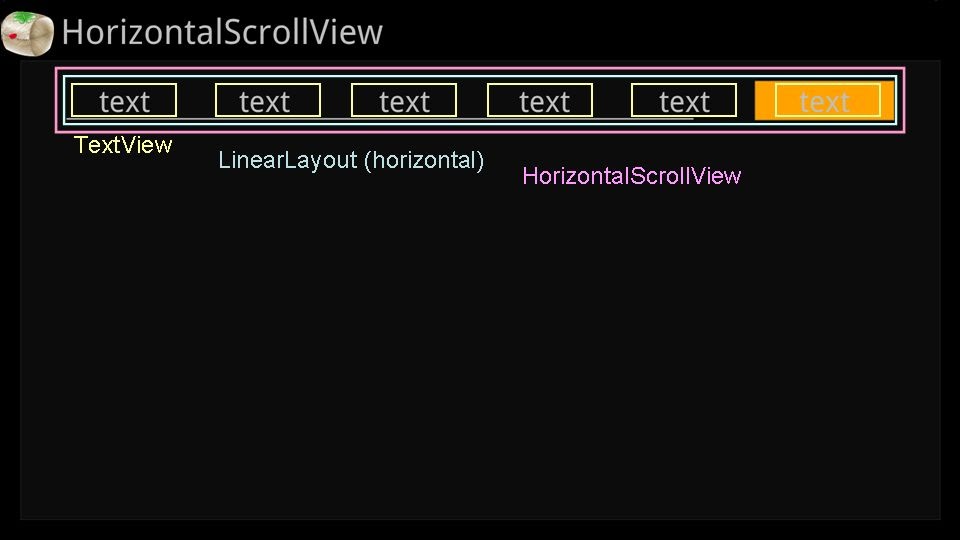
[HorizontalScrollView] 水平滾動無螢寬限制 (初階)


< 事先定義於.xml >
假設畫面上需要水平擺放8個TextView, 但寬度只能呈現6個

./res/layout/main.xml (這邊只擷取重點段)
<HorizontalScrollView
    android:id="@+id/scrollView"
    android:layout_width="fill_parent"
    android:layout_height="80dp"
    android:layout_marginTop="40dp"
    android:layout_marginLeft="80dp"
    android:layout_marginRight="80dp"
    >
    <!-- HorizontalScrollView需要一個layout來輔助widget的排列方式, LinearLayout在此擔任orientation="horizontal"(水平排列)的角色 -->    <LinearLayout
        android:orientation="horizontal"
        android:layout_width="match_parent"
        android:layout_height="match_parent"
        >
        <!-- gravity="center_horizontal"表示文字為水平居中 -->
        <!-- focusable與focusableInTouchMode必須為true才能focus此widget -->
        <!-- 背景background鎖定./res/drawable/selector.xml其後解釋 -->
       
           <TextView

                android:id="@+id/tv1"
                android:layout_width="280dp"
                android:layout_height="80dp"
                android:text="text"
                android:textSize="60dp"
                android:gravity="center_horizontal"
                android:focusable="true"
                android:focusableInTouchMode="true"
                android:background="@drawable/selector"
                />
            <TextView
                android:id="@+id/tv2"
                android:layout_width="280dp"
                android:layout_height="80dp"
                android:text="text"
                android:textSize="60dp"
                android:gravity="center_horizontal"
                android:focusable="true"
                android:focusableInTouchMode="true"
                android:background="@drawable/selector"
                />
            <TextView
                android:id="@+id/tv3"
                android:layout_width="280dp"
                android:layout_height="80dp"
                android:text="text"
                android:textSize="60dp"
                android:gravity="center_horizontal"
                android:focusable="true"
                android:focusableInTouchMode="true"
                android:background="@drawable/selector"
                />
            <TextView
                android:id="@+id/tv4"
                android:layout_width="280dp"
                android:layout_height="80dp"
                android:text="text"
                android:textSize="60dp"
                android:gravity="center_horizontal"
                android:focusable="true"
                android:focusableInTouchMode="true"
                android:background="@drawable/selector"
                />
            <TextView
                android:id="@+id/tv5"
                android:layout_width="280dp"
                android:layout_height="80dp"
                android:text="text"
                android:textSize="60dp"
                android:gravity="center_horizontal"
                android:focusable="true"
                android:focusableInTouchMode="true"
                android:background="@drawable/selector"
                />
            <TextView
                android:id="@+id/tv6"
                android:layout_width="280dp"
                android:layout_height="80dp"
                android:text="text"
                android:textSize="60dp"
                android:gravity="center_horizontal"
                android:focusable="true"
                android:focusableInTouchMode="true"
                android:background="@drawable/selector"
                />
            <TextView
                android:id="@+id/tv7"
                android:layout_width="280dp"
                android:layout_height="80dp"
                android:text="text"
                android:textSize="60dp"
                android:gravity="center_horizontal"
                android:focusable="true"
                android:focusableInTouchMode="true"
                android:background="@drawable/selector"
                />
            <TextView
                android:id="@+id/tv8"
                android:layout_width="280dp"
                android:layout_height="80dp"
                android:text="text"
                android:textSize="60dp"
                android:gravity="center_horizontal"
                android:focusable="true"
                android:focusableInTouchMode="true"
                android:background="@drawable/selector"
                />
    </LinearLayout>
</HorizontalScrollView>

./res/drawable/selector.xml 定義行為
 <selector xmlns:android="http://schemas.android.com/apk/res/android">
    <!-- focus成立, 但還未click -->  
    <item
        android:state_focused="true"
        android:state_pressed="false"
        android:drawable="@drawable/label_focus" />
    <!-- focus成立, 也做了click -->
    <item
        android:state_focused="true"
        android:state_pressed="true"
        android:drawable="@drawable/label_selected" />

</selector>


./src/com.tsots.Hori_basic/Hori_basic.java
package com.tsots.Hori_basic;

import android.app.Activity;
import android.content.Context;
import android.os.Bundle;
import android.view.Window;
import android.widget.HorizontalScrollView;
import android.widget.TextView;

public class Activity_Hori_basic extends Activity
{
    Context context = Activity_Hori_basic.this;
    HorizontalScrollView scrollView;
    TextView tv1, tv2, tv3, tv4, tv5, tv6, tv7, tv8;

    @Override
    public void onCreate(Bundle savedInstanceState)
    {
        this.requestWindowFeature(Window.FEATURE_NO_TITLE);
        super.onCreate(savedInstanceState);
        setContentView(R.layout.main);
             
        scrollView = (HorizontalScrollView) findViewById(R.id.scrollView);
        tv1 = (TextView) findViewById(R.id.tv1);
        tv2 = (TextView) findViewById(R.id.tv2);
        tv3 = (TextView) findViewById(R.id.tv3);
        tv4 = (TextView) findViewById(R.id.tv4);
        tv5 = (TextView) findViewById(R.id.tv5);
        tv6 = (TextView) findViewById(R.id.tv6);
        tv7 = (TextView) findViewById(R.id.tv7);
        tv8 = (TextView) findViewById(R.id.tv8);
    }      
}